Ransomware Protection: Your computer screen goes black. A message appears: your files are encrypted and you have 48 hours to pay $50,000 in Bitcoin or lose everything forever. This is ransomware, and it’s no longer science fiction. In 2024, ransomware attacks targeted organizations at a rate of one every 11 seconds. Hospitals couldn’t access patient records. Businesses couldn’t operate. Individuals lost irreplaceable personal files.
But here’s what matters: ransomware is preventable. Most attacks succeed not because they’re technically unstoppable, but because defenders don’t understand how they work. In this guide, we’ll explain exactly what ransomware is, how attackers deploy it, and most importantly, how you can protect yourself.
Understanding Ransomware: The Threat Landscape
Ransomware has evolved dramatically in the past five years. What started as opportunistic malware has transformed into a sophisticated criminal enterprise worth billions of dollars annually. The FBI reported that in 2024 alone, ransomware attacks cost organizations $34.5 billion globally. That’s not just corporate damage; those costs cascade down to consumers through higher prices, delayed services, and compromised privacy.
The reason ransomware has become so prevalent is simple: it works. Unlike other cyberattacks that steal data quietly, ransomware creates immediate, undeniable pressure. Attackers encrypt critical files and demand payment within a specific timeframe. The psychological impact is enormous. Hospital administrators facing a message that patient records will be permanently deleted in 48 hours face enormous pressure to pay. Business owners watching their operations grind to a halt feel the same urgency.
What makes modern ransomware particularly dangerous is that it’s not just about encryption. Contemporary ransomware attacks follow a pattern called “double extortion.” Attackers first steal sensitive data from your system, then encrypt your files, then demand payment. If you refuse to pay, they threaten to sell your stolen data on the dark web. This two-pronged approach creates pressure even for organizations with good backups. After all, a backup protects you from encryption, but not from data theft and public exposure.
How Ransomware Actually Gets Inside Your System
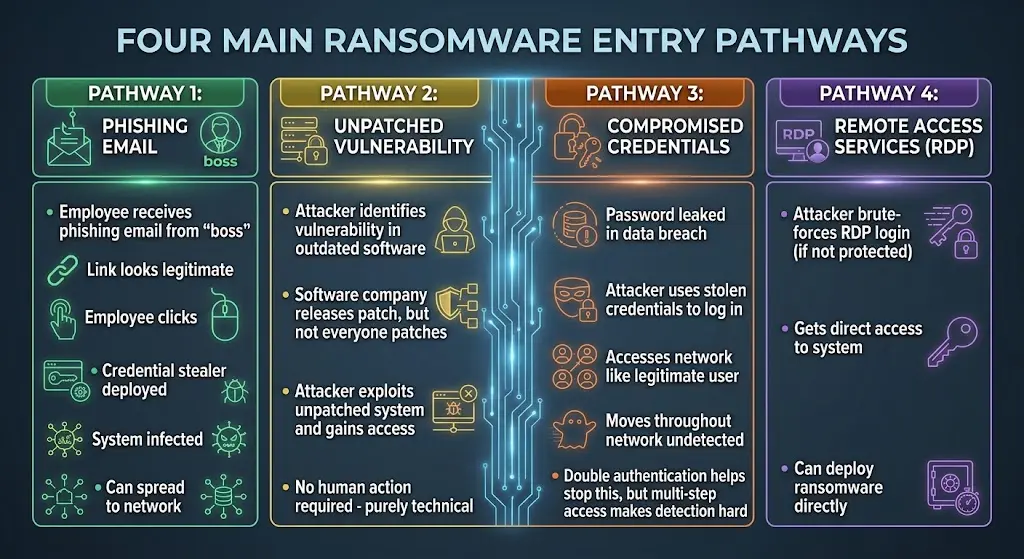
Understanding how ransomware spreads is crucial because prevention requires breaking the attack chain at the earliest possible point. Ransomware doesn’t magically appear on your computer. It follows specific pathways, and each pathway represents an opportunity for defense.
The most common entry point is the user. Phishing emails appear to be legitimate messages from trusted contacts. An employee receives an email claiming to be from their bank, requesting they click a link to verify account information. Or they receive an email from their CEO requesting an urgent wire transfer with an attachment containing details. The attachment looks benign, but opening it deploys ransomware. These phishing campaigns are now often powered by AI, making them more convincing than ever. An email written by ChatGPT has perfect grammar, contextual details, and psychological manipulation tactics refined through machine learning.
The second pathway is unpatched vulnerabilities. Software developers regularly discover security flaws and release patches to fix them. But many organizations and individuals don’t install these patches immediately. Attackers monitor security bulletins and identify which vulnerabilities affect which software. Within days of a patch release, attackers begin scanning the internet for systems that haven’t been updated. Any system running old, vulnerable software becomes an easy target. This pathway doesn’t require user interaction. A system can be infected simply because it hasn’t received a security update.
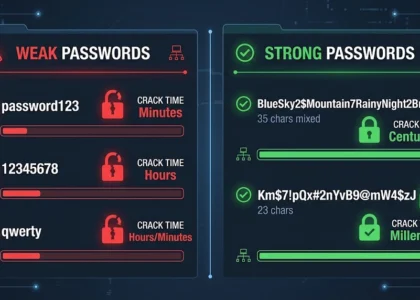
The third pathway is compromised credentials. If an attacker gains access to your username and password, they can log into your accounts directly. They might acquire these credentials through password reuse, data breaches, credential stuffing attacks, or simply guessing weak passwords. Once inside your account, they have legitimate access to your systems. They can move through your network, install ransomware on critical servers, and prepare the attack. By the time you notice something is wrong, the encryption process is already underway.
The fourth pathway is remote access services. Many organizations use Remote Desktop Protocol (RDP) or similar services to allow employees to work from home or provide technical support. If these services aren’t properly secured with strong passwords and multi-factor authentication, attackers can brute-force their way in. Once they have remote access, they control your computer just like a legitimate employee would.
Understanding these pathways reveals something important: most ransomware attacks require human involvement on your part, or they exploit your failure to maintain basic security practices. This is both bad and good news. It’s bad because it means security depends partly on human behavior, which is inherently fallible. But it’s good because it means prevention is achievable through reasonable precautions.
The Anatomy of a Ransomware Attack
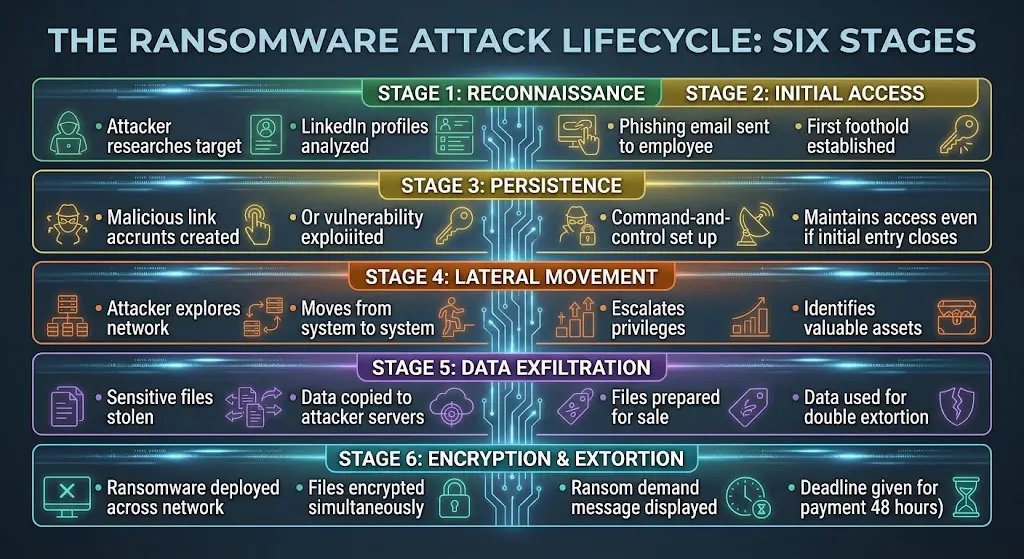
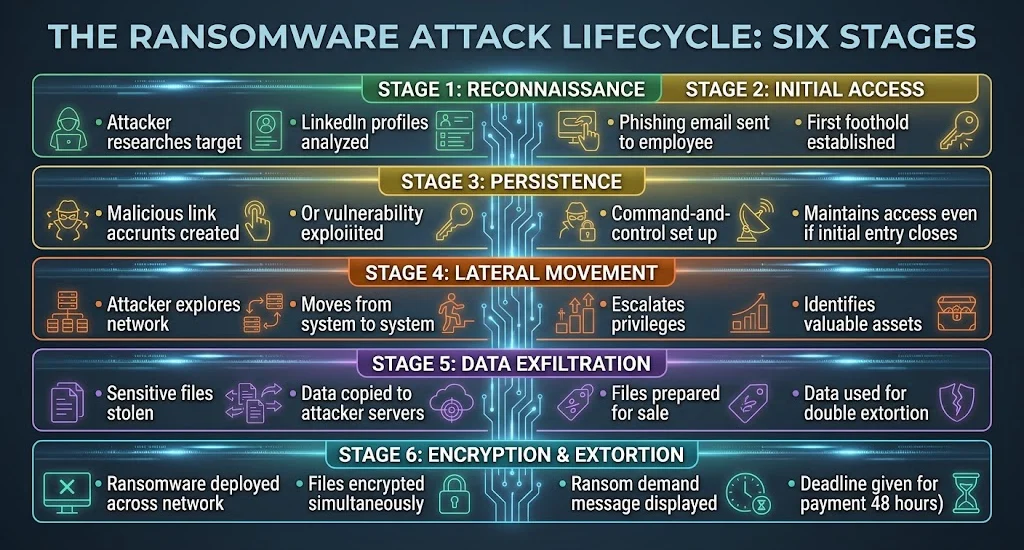
A typical ransomware attack unfolds in stages. Understanding this progression helps explain why certain defenses are critical and why others don’t matter much.
The first stage is reconnaissance. Attackers research their target, identifying valuable assets, security measures, and potential entry points. They might spend days or weeks just gathering information. They search LinkedIn to identify employees, look at company websites to understand what software is used, scan the internet for exposed systems, and analyze the target’s network infrastructure. This research stage is often completely unnoticed.
The second stage is initial access. This is where attackers get a foothold. They might send a phishing email, exploit a known vulnerability in an exposed system, or use compromised credentials. The goal is to gain access to any system within the network. This might be a workstation, a web server, or any device connected to the network. At this point, the attacker has access, but the ransomware isn’t deployed yet.
The third stage is persistence. Once inside, the attacker establishes a way to maintain access even if the initial entry point is discovered and closed. They might install a backdoor, create new user accounts, or establish command-and-control communication channels. The goal is to ensure they can come back later. This stage might last days or weeks while the attacker explores the network.
The fourth stage is lateral movement. The attacker begins exploring the network, moving from system to system, trying to reach valuable assets. They’re looking for file servers, backup systems, databases, and other resources. They’re gathering information about the network architecture and identifying the most critical systems. They’re also escalating their privileges, trying to gain administrative access that would let them access more systems.
The fifth stage is data exfiltration. Before deploying ransomware, sophisticated attackers steal valuable data. They copy files to external servers or upload them to cloud storage under attacker control. This is the “double extortion” element. Even if you have backups and can recover from encryption, the attacker still has your data and can sell it or release it publicly. This stage is perhaps the most dangerous because the damage occurs even if you handle the ransomware correctly.
The sixth and final stage is encryption and extortion. Only after all these preparation steps are complete does the attacker deploy the ransomware. Ransomware encrypts files across the network simultaneously, making recovery difficult. A message appears on affected computers with ransom demands. Some attackers also leak stolen data on the dark web as additional pressure.
This progression reveals something critical: ransomware attacks are not quick. They typically take days or weeks from initial access to encryption. This means organizations have time to detect and stop attacks before they reach the encryption phase. But it requires monitoring and alertness. If you don’t notice unusual network activity, unpatched systems, or credential compromises, you won’t have a chance to stop the attack.
Real-World Ransomware Cases: Learning from Attacks
Examining recent ransomware attacks reveals patterns and teaches lessons that apply to any organization or individual.
The first major case is LockBit, the most prolific ransomware operation of 2024. LockBit attacked hundreds of organizations worldwide, including hospitals, manufacturing companies, and government agencies. One notable victim was a major food distribution company that couldn’t process orders for several weeks. Customers went without supplies, stores were temporarily empty, and the financial impact was enormous. LockBit demanded $50 million for decryption. The company refused to pay, recovered from backups over several weeks, but the operational disruption cost far more than the ransom demand. This case demonstrates that paying doesn’t guarantee a good outcome, and the operational costs of recovery often exceed ransom amounts.
The second case is a hospital system in the United States that suffered a ransomware attack during the COVID-19 pandemic. When the attack deployed, emergency rooms couldn’t access patient records. Surgeries were postponed. Critical patient care was delayed. The hospital paid a $20 million ransom to regain access quickly. But here’s the critical part: the ransom didn’t guarantee recovery. The decryption key provided by attackers only partially worked, and the hospital still had to rebuild systems from backups anyway. They paid $20 million and still experienced most of the disruption. This case demonstrates that ransoms don’t necessarily solve the problem.
The third case is the MOVEit Transfer breach, which was a supply chain attack that led to ransomware deployment. Attackers identified a vulnerability in MOVEit, a file transfer application used by thousands of organizations. They exploited this vulnerability not just in the software company itself, but in thousands of customer organizations using the same software. The result was unprecedented scale: a single attack affected tens of thousands of organizations. This case demonstrates the power of supply chain attacks and why patching vulnerabilities immediately is critical.
These cases share common threads. All could have been prevented or mitigated with proper defenses. All were worse because defenders lacked backups or monitoring systems. All demonstrated that paying ransoms doesn’t guarantee recovery and often makes future attacks more likely.
Defending Against Ransomware: The Layered Approach
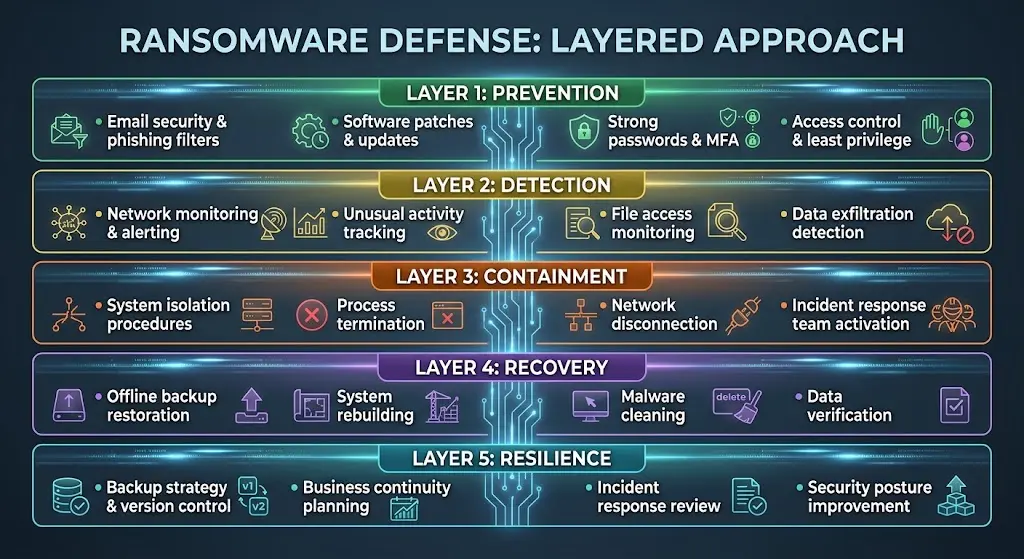
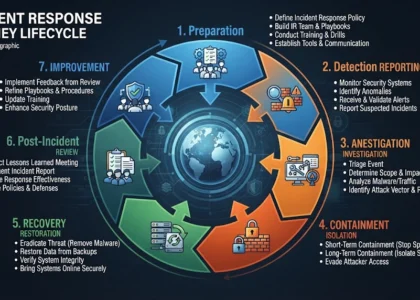
Ransomware defense isn’t a single solution. It’s a combination of technical controls, organizational processes, and human awareness working together. Security professionals call this “defense in depth” or “layered defense.”
The first layer is prevention. This means stopping ransomware from getting in at all. Email security is critical here. Attackers rely on phishing emails to get initial access. Advanced email filtering can detect many malicious emails before they reach users. Multi-factor authentication prevents attackers from using compromised credentials to log in. If a password is leaked in a data breach, MFA means the attacker still can’t access your accounts. Keeping software updated with security patches closes the vulnerabilities that attackers exploit. A single unpatched system can give an attacker the access they need to encrypt an entire network.
The second layer is detection. Even with strong prevention, some attacks will get through. Detection means identifying that an attack is happening so you can stop it before encryption occurs. This requires monitoring network activity for unusual behavior. Are files being accessed at unusual times? Is data being transferred to external systems? Is someone accessing systems they shouldn’t have access to? Organizations should monitor for these indicators. For individuals, this might mean paying attention to unusual system behavior, unexpected CPU activity, or strange network connections.
The third layer is containment. If an attack is detected, the goal is to limit its spread. This means isolating affected systems so attackers can’t move to other computers. It means disconnecting systems from the network to prevent data exfiltration. It means killing suspicious processes before they finish their task. Quick containment can mean the difference between an attack affecting one system and an attack affecting your entire network.
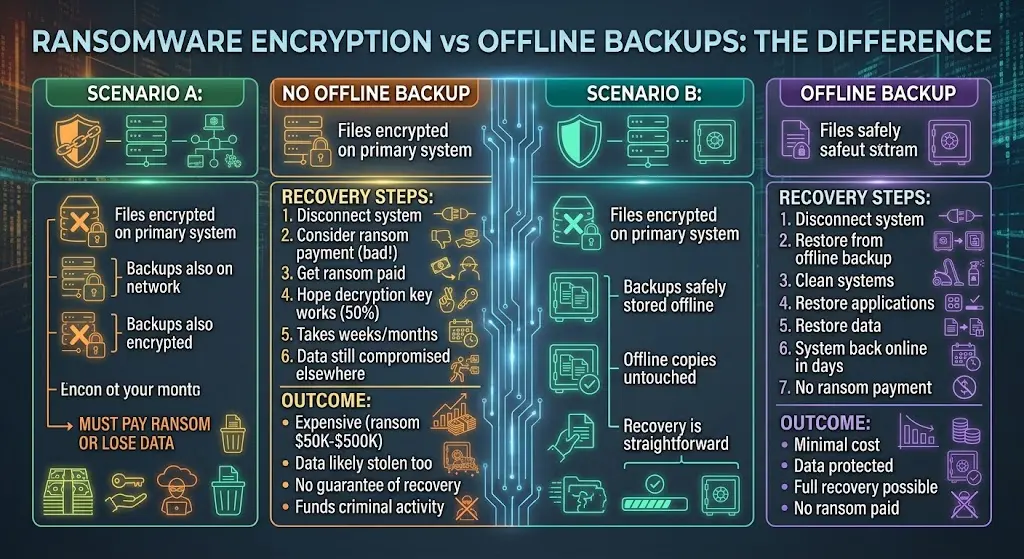
The fourth layer is recovery. Even with good prevention and detection, some organizations will experience ransomware attacks. Having a recovery plan is essential. This means maintaining backups that attackers can’t access. Backups should be stored offline or in cloud storage where they’re separate from your main systems. If you have good backups, you can recover from ransomware without paying ransom. You restore files from the backup, clean your systems, and move forward.
The fifth layer is resilience. This means building your organization so it can continue functioning even during an attack. If your systems go down, can you still serve customers? Do you have manual processes you can use temporarily? Can critical functions operate with reduced capacity? Building resilience means the impact of ransomware is minimized.
Essential Ransomware Protection Strategies
mplementing effective ransomware protection requires attention to specific practices that directly prevent or mitigate attacks.
The most critical practice is maintaining offline backups. This cannot be overstated. If attackers encrypt your data but you have a recent backup stored offline, you don’t need to pay ransom. You can restore from backup. Many organizations have discovered that their backup systems were also compromised because the backups were on the same network as the primary systems. Offline backups solve this problem. Store backups on external drives disconnected from your network, or use cloud backup services that maintain version history so you can recover even if current backups are compromised.
The second critical practice is employee training. Most ransomware attacks start with phishing emails. If employees can identify phishing attempts and report them instead of clicking links or opening attachments, many attacks never gain initial access. Training should be ongoing. It should include real phishing simulations so employees practice identifying suspicious emails. Training should emphasize the seriousness of security; employees need to understand that clicking a suspicious link isn’t just an inconvenience, it puts the entire organization at risk.
The third critical practice is software updates. When vendors release security patches, install them quickly. Don’t delay updating systems because you’re worried about disruption. The disruption from a patch is minimal; the disruption from a ransomware attack is catastrophic. Organizations should prioritize patching critical systems immediately and have processes to ensure updates are deployed consistently.
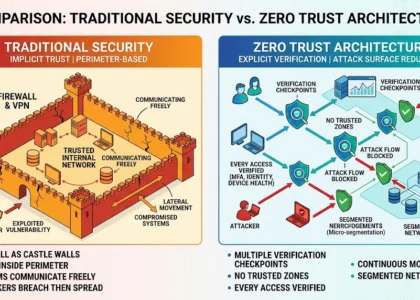
The fourth critical practice is access control. Implement the principle of least privilege, which means users and systems should only have access to resources they actually need. If someone’s job doesn’t require access to a particular file server, they shouldn’t have access. If they don’t get access, attackers using their compromised credentials can’t access those systems either. Use network segmentation to separate systems so that even if attackers compromise one system, they can’t easily move to others.
The fifth critical practice is multi-factor authentication. Even if attackers compromise passwords through data breaches or credential stuffing attacks, MFA ensures they can’t actually log in. Apply MFA especially to administrative accounts and remote access systems. These are the pathways attackers most commonly exploit.
The sixth critical practice is monitoring and incident response. Organizations need visibility into what’s happening on their networks. This means logging system activity, monitoring network traffic, and alerting on unusual behavior. It also means having an incident response plan. If an attack is detected, who handles it? What are the first steps? Who communicates with stakeholders? Having a plan before an attack occurs means you can respond quickly.
What to Do If You’re Infected: Immediate Actions
Despite best efforts, some organizations and individuals will experience ransomware infection. Knowing how to respond can minimize damage.
The first action is isolation. Disconnect the infected system from the network immediately. If it’s a workstation, unplug the network cable or disconnect WiFi. If it’s a server, isolate it so it can’t spread ransomware to other systems. Tell other users not to use that system. Disable remote access services temporarily. The goal is to stop the ransomware from spreading.
The second action is assessment. Determine what ransomware you have. Take a photo of the ransom message with your phone. Document exactly what you see. Look for file extensions that changed, as these often indicate ransomware. Identify the range of dates when files were modified. This information helps determine what systems might be affected and what backups might be clean.
The third action is reporting. Report the attack to law enforcement. In the US, report to the FBI’s Internet Crime Complaint Center (IC3) or the Secret Service. Many countries have similar agencies. Reporting helps authorities track ransomware operations and occasionally leads to arrests. Report to relevant regulatory agencies if you operate in regulated industries. For example, healthcare organizations report to HIPAA authorities.
The fourth action is containment assessment. Work with your IT team or external security professionals to determine how far the attack spread. Check other systems for signs of infection. Review backup systems to ensure they’re clean. This investigation is critical because you need to know what systems can be trusted.
The fifth action is recovery planning. If you have clean backups, restore from them. Start with critical systems first, then less critical systems. As you restore systems, ensure attackers haven’t compromised them again. Clean malware from systems before restoring data. Verify that backups are actually clean by checking file integrity.
The sixth action is review and hardening. After recovery, identify how the attack occurred. Was it a phishing email? An unpatched vulnerability? Compromised credentials? Address that specific weakness. Implement additional monitoring. Strengthen access controls. Review your response plan and improve it based on what you learned.
The Ransom Dilemma: Why You Shouldn’t Pay
Organizations facing ransomware often consider paying the ransom. Law enforcement and security experts universally recommend against this, and for good reasons.
Paying ransom funds criminal activity. Every dollar paid to ransomware operators goes to fund their operations and future attacks. It makes ransomware more profitable, which incentivizes attacks. When organizations pay, it encourages attackers to demand ransoms from others. By paying, you’re directly contributing to future attacks on other organizations.
Paying ransom provides no guarantee of recovery. Some attackers simply take the money and don’t provide decryption keys. Others provide keys that only partially work. Some provide keys that restore files but don’t remove the underlying malware, leaving your systems still compromised. You have no legal recourse if attackers fail to deliver on their promises.
Paying ransom often breaks the law. Many countries have sanctions against designated criminal groups and terrorist organizations. Paying ransom to sanctioned groups violates these laws. The US Treasury OFAC has issued warnings that paying ransom to certain ransomware groups can result in civil and criminal penalties. Check the latest guidance before making payment decisions.
Paying ransom doesn’t solve data theft. Even if attackers decrypt your files, they still have copies of your data. They can still sell it on the dark web or use it for extortion later. Decryption keys address only half the problem created by double extortion attacks.
Instead of paying ransom, focus on recovery from backups, restoration of systems, and identification of how the attack occurred. These approaches are more effective and don’t fund future attacks.
FAQ: Ransomware Questions
Q: Can ransomware infect Mac computers?
A: Yes. While ransomware historically targeted Windows systems because they’re more prevalent, modern ransomware often affects multiple platforms including macOS and Linux. Mac users should apply the same precautions: keep software updated, use strong passwords with multi-factor authentication, maintain offline backups, and be skeptical of unexpected emails.
Q: Is paying a small ransom better than a large one?
A: No. The amount doesn’t matter. Paying any ransom validates the attacker’s business model and encourages future attacks. It doesn’t guarantee recovery. It often violates sanctions laws. Don’t pay.
Q: Can security software prevent all ransomware?
A: No. Ransomware evolves constantly, and new variants emerge regularly. Antivirus and anti-malware software are important layers of defense, but they’re not sufficient alone. You need multiple layers: patches, backups, access controls, monitoring, and training.
Q: How long does ransomware recovery typically take?
A: Recovery time depends on several factors. If you have clean backups on external drives, recovery might take days to restore critical systems. If you need to investigate how the attack occurred and rebuild systems from scratch, recovery can take weeks or months. Organizations without backups often take much longer and may suffer permanent data loss.
Q: Should I pay for cyber insurance?
A: Many organizations find cyber insurance valuable. Good policies cover incident response costs, recovery expenses, notification requirements, and sometimes ransom coverage. Be careful about policies that encourage ransom payment; some insurers discourage paying ransom. Evaluate policies carefully to ensure coverage aligns with your risk tolerance.
Conclusion: Ransomware is Preventable
Ransomware has become one of the most serious cybersecurity threats of the 2020s. The statistics are alarming. The stories are frightening. But the most important fact is that ransomware is largely preventable. Most successful attacks exploit basic security weaknesses that should never exist.
Organizations that maintain offline backups, keep software updated, enforce access controls, train employees, and monitor networks for suspicious activity are dramatically less likely to suffer successful ransomware attacks. Even organizations that are attacked can recover quickly if they have proper backups and incident response plans.
The key is understanding that ransomware defense is not a one-time project. It’s an ongoing process. It requires attention to multiple layers: prevention through patches and training, detection through monitoring, recovery through backups, and resilience through planning. It requires commitment from leadership, technical expertise from security teams, and participation from every employee.
Ransomware attacks are inevitable in a connected world. But ransomware damage is not inevitable. With proper preparation and defense, you can survive an attack with minimal impact. The organizations that suffer catastrophic ransomware damage are typically those that ignored basic security practices. Don’t be that organization.
Find more Cyber Security articles or contact us to learn how to better protect yourself, your business, and your digital environment from modern cyber threats. Also, explore How attackers bypass MFA to commit CEO fraud.
Understanding cyberattacks requires seeing the complete picture. It starts with research: attackers study you on LinkedIn and company websites using AI to craft personalized phishing emails. If you click, they gain access.
From there, they attempt to escalate privileges by exploiting weak passwords and ypassing multi-factor authentication using social engineering or technical weaknesses.
Business Email Compromise tactics impersonating executives and creating false urgency often accelerate this stage. Once deep in your network, they steal sensitive data before deploying ransomware or selling your information to identity thieves. The goal is always the same: money. Understanding how attackers think, which tactics work at each stage, and why your defenses matter is the foundation of real security.
EXTERNAL LINKS
This article is published exclusively for informational and educational purposes. Its goal is to enhance cybersecurity awareness, inform users, and help prevent modern digital threats.The information presented is not intended for malicious use or to promote illegal activities.