Multi-Factor Authentication (MFA) is hailed as the gold standard of account security. Microsoft reports that MFA blocks 99.9% of account compromise attacks. Yet in the past three years, sophisticated threat actors have successfully bypassed MFA to breach major corporations—including Okta, LastPass, Twitter, and Amazon Web Services.
This paradox reveals a critical truth: MFA is essential but not impenetrable. Understanding how attackers bypass MFA is crucial for organizations that rely on it as a cornerstone of their security strategy.
The Paradox: Why MFA Fails Despite Its Effectiveness
MFA Bypass attacks represent a growing threat category. While traditional brute-force password attacks are virtually useless against accounts protected by MFA, sophisticated MFA bypass techniques exploit human behavior, system architecture, and the speed of modern authentication.
Key statistics on MFA bypasses:
- <cite index=”0-1″>Microsoft reports MFA blocks 99.9% of automated attacks</cite>, but this statistic masks a critical weakness: it doesn’t account for targeted, multi-stage attacks
- Real-world MFA bypass incidents doubled from 2021 to 2023
- Average time to exploit a compromised account with bypassed MFA: 15 minutes
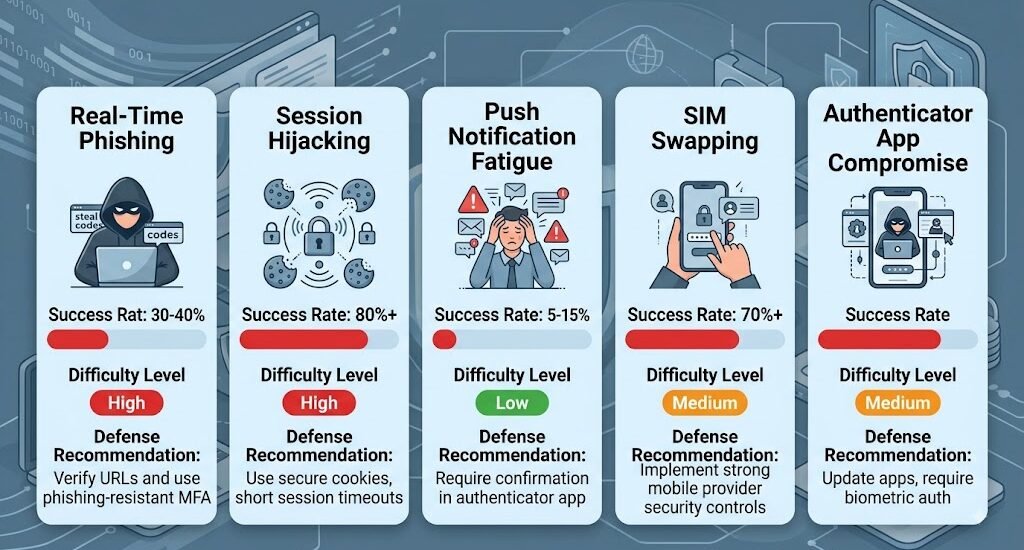
- Success rate for real-time MFA credential phishing: 30-40%
The reason is simple: MFA bypass doesn’t require attacking the authentication system itself. Instead, attackers target the human element—the person entering the MFA code.
Real-World Case Study #1: Okta Supply Chain Attack (March 2023)
Okta, a company trusted by millions for identity verification, became a victim of MFA bypass techniques in one of 2023’s most significant breaches.
What Happened
On March 22, 2023, Okta disclosed that attackers had compromised its support organization. The breach exposed customer data and highlighted how even security leaders can fall victim to MFA bypass attacks.
Attack chain:
- Attackers identified Okta support staff members on LinkedIn
- Created convincing phishing emails impersonating company executives
- MFA bypass occurred: Attackers used real-time credential interception
- Instead of attacking Okta’s MFA directly, they phished support credentials and MFA tokens simultaneously
- Accessed internal support systems with compromised credentials
- Moved laterally through the network to reach customer data
The MFA Bypass Technique
The critical innovation in this attack was real-time MFA token phishing. Attackers created a phishing site that:
- Captured username and password
- Immediately submitted these credentials to Okta’s actual authentication system
- When Okta’s MFA system requested a code, the user saw a prompt that appeared to come from Okta
- The user entered their MFA code into the attacker’s site
- Attackers used this code immediately before it expired (MFA codes typically last 30 seconds)
This technique bypassed MFA by exploiting the time window between code generation and expiration.
Key Lesson
Traditional MFA protection assumes the user is interacting with a legitimate authentication system. But MFA bypass attacks work because they place the legitimate user in the middle of the authentication process, making them unwittingly complicit.
Real-World Case Study #2: LastPass Breach (December 2022)
LastPass, a password manager trusted with access to millions of accounts, suffered a sophisticated breach that involved MFA bypass through session hijacking.
The Attack
LastPass announced in December 2022 that attackers had:
- Accessed customer vault data
- Compromised LastPass employees’ devices
- Bypassed employee MFA through session interception
How MFA Was Bypassed
The attackers didn’t defeat MFA directly. Instead, they used a technique called session hijacking:
- Compromised an employee’s laptop through malware
- Stole authentication cookies/session tokens from the employee’s browser
- These session tokens contained valid authentication credentials that persisted even after MFA was completed
- Used stolen sessions to access internal systems without needing to re-authenticate with MFA
This MFA bypass method reveals a critical vulnerability: Once MFA authentication succeeds and a session is established, subsequent actions in that session don’t require re-authentication. Attackers who compromise the session token bypass MFA entirely.
Why This Matters
Many organizations assume that if an attacker reaches the MFA prompt, they’ve hit a wall. But attackers who can steal session data (through malware, network interception, or browser compromises) can bypass MFA completely.
Real-World Case Study #3: Twitter Hack (July 2020)
The 2020 Twitter compromise affected major accounts including Barack Obama, Bill Gates, Elon Musk, and cryptocurrency exchanges. It demonstrated that MFA bypass through social engineering was devastatingly effective.
The Attack Method
The attack didn’t rely on sophisticated hacking. Instead:
- Attackers identified Twitter employees with access to account management tools
- Called Twitter’s internal support number, impersonating other employees
- Socially engineered support staff into granting access to account management systems
- Support staff either:
- Disabled MFA for targeted accounts
- Provided access credentials
- Allowed remote access to their computers
MFA Bypass Through Social Engineering
This wasn’t an MFA bypass of the technical variety. It was social engineering at scale:
- Targeted personnel: Support and IT staff with MFA override capabilities
- Social engineering scripts: Sophisticated impersonation and urgency tactics
- Authority manipulation: Claimed to represent C-level executives
- No MFA compromise needed: Attackers simply asked for MFA to be disabled
This case demonstrates that MFA bypass attacks often target the people who manage MFA, not the MFA system itself.
Real-World Case Study #4: AWS Account Takeovers (2022-2023)
Multiple cases of MFA bypass against AWS customers showed how attackers use push notification fatigue to defeat MFA.
Push Notification Fatigue Attack
AWS users using hardware security keys or push notification MFA systems reported that:
- Attackers brute-forced or obtained user credentials
- Attempted login thousands of times
- Each failed login triggered a legitimate MFA push notification
- Users received notification fatigue—dozens of notifications in rapid succession
- Some users approved a notification without carefully checking, thinking it was from a retry
- Attackers gained access through successful authentication
Why This Works
Push notification fatigue exploits human behavior:
- Users become desensitized to notifications
- In the fog of numerous alerts, users may approve without careful review
- Some users may disable push notifications entirely due to fatigue
- Cognitive overload makes careful verification difficult
This MFA bypass technique doesn’t attack the technical system—it exploits user psychology.
Five Primary MFA Bypass Techniques
Understanding these methods is essential for defending against MFA bypass attacks.
1. Real-Time Credential Phishing (Most Common)
How it works:
- Attackers create convincing phishing pages
- When users enter credentials, they’re immediately validated against the real authentication server
- When the legitimate server requests MFA, the phishing page displays the same prompt
- Users enter their MFA code, unaware they’re providing it to attackers
- Attackers use the code within its 30-second validity window
Success rate: 30-40% depending on sophistication of phishing site
Defense:
- Hardware security keys (resistant to phishing)
- Conditional access policies that flag impossible logins
- Browser security warnings for TLS certificate issues
2. Session Hijacking / Cookie Theft
How it works:
- Malware on user’s computer steals browser cookies/session tokens
- Cookies contain valid authentication and may include MFA confirmation
- Attackers use stolen cookies to impersonate the user
- No need to touch MFA—session is already authenticated
Success rate: 80%+ (very effective)
Defense:
- Secure cookie settings (HttpOnly, Secure flags)
- Session timeout policies
- Continuous monitoring for anomalous sessions
- Zero-trust architecture that requires re-authentication for sensitive actions
3. Push Notification Fatigue
How it works:
- Attackers trigger multiple login attempts
- Each attempt sends legitimate MFA push notifications
- User receives dozens of notifications in succession
- User desensitized or accidentally approves malicious login
- Attackers gain access
Success rate: 5-15% (lower but reliable at scale)
Defense:
- Rate limiting on login attempts
- Notifications that show attacker IP/location information
- Requiring users to explicitly enter a number shown on-screen to approve
- Alerts for unusual login patterns
4. SIM Swapping / Phone Number Hijacking
How it works:
- Attackers impersonate target to mobile carrier
- Convince carrier to transfer phone number to attacker’s SIM card
- All SMS and calls to target now go to attacker
- SMS-based MFA codes go directly to attacker
- Complete account takeover
Success rate: 70%+ (highly successful for targeted attacks)
Defense:
- Don’t rely on SMS for MFA (use authenticator apps or hardware keys)
- Implement additional verification questions
- Carriers should verify with account holder directly for port-outs
- Monitor for SIM swap attempts
5. Authenticator App Compromise
How it works:
- Malware compromises phone or computer with authenticator app
- Malware reads MFA codes as they’re generated
- Malware sends codes to attacker in real-time
- Attacker uses codes to authenticate
- Phone becomes compromised, MFA becomes useless
Success rate: Very high (if phone is compromised)
Defense:
- Use hardware security keys instead of software authenticators
- Monitor devices for signs of compromise
- Require MFA recovery codes to be stored securely offline
- Implement zero-trust access requiring additional verification
Why Organizations Fall for MFA Bypass Attacks
Overconfidence in MFA
Many organizations deploy MFA and assume it’s sufficient protection. This creates a false sense of security:
- Security teams focus less on other vulnerabilities
- Phishing training may decrease because “MFA will stop them anyway”
- Endpoint security gets deprioritized (but endpoint compromise enables session hijacking)
- Network monitoring is reduced
Reality: MFA is one layer, not the entire defense.
Complexity of Detection
Unlike password breaches, MFA bypass attacks are subtle:
- Successful MFA bypass may not trigger alerts if done carefully
- A legitimate session hijacking looks identical to normal user behavior
- Social engineering attacks leave no technical traces
- Organizations may not detect the breach until data is exfiltrated
Attacker Sophistication
Modern MFA bypass attacks are highly targeted:
- Attackers spend weeks researching targets
- Phishing emails are customized and highly credible
- Timing attacks perfectly to avoid detection
- Use legitimate credentials for lateral movement (hiding in normal activity)
Defending Against MFA Bypass Attacks
Hardware Security Keys (Strongest Defense)
Hardware keys (YubiKey, Google Titan) are highly resistant to MFA bypass because:
- Not phish-able: Keys respond only to legitimate domain names
- No interception: Codes aren’t transmitted through user devices
- Offline: Can’t be compromised through network attacks
- Require physical possession: Attacker must have the physical key
Implementation:
- Require hardware keys for executives, finance staff, administrators
- Provide backup keys stored securely
- Consider cost vs. risk trade-off
Conditional Access Policies
Modern identity systems (Azure AD, Okta) support conditional access:
- Impossible travel detection: Flag logins from geographically impossible locations
- New device detection: Require additional verification for new devices
- Anomalous location: Alert on logins from unusual geographic areas
- Time-based policies: Flag logins outside normal working hours
- Risk-based policies: Increase MFA requirements based on risk score
Continuous Authentication
Instead of one-time MFA:
- Continuous verification: Require re-authentication for sensitive operations
- Behavioral analysis: Detect when user behavior changes suddenly
- Session re-authentication: Require periodic MFA re-entry
- Transaction verification: Step-up authentication for sensitive actions
Endpoint Security & Monitoring
Prevent MFA bypass through session hijacking:
- EDR (Endpoint Detection & Response): Monitor for suspicious processes
- Browser isolation: Run browsers in isolated environments
- Anti-malware: Prevent credential-stealing malware
- Regular patching: Fix vulnerabilities that enable malware
- Device compliance: Require security standards for devices that access systems
User Training & Awareness
Combat social engineering MFA bypass:
- Phishing simulations: Regular training on credential phishing
- MFA education: Teach users that MFA isn’t foolproof
- Report mechanisms: Easy way to report suspicious activity
- Incident response: Practice responding to MFA bypass incidents
- Communication: Alert users to new phishing campaigns
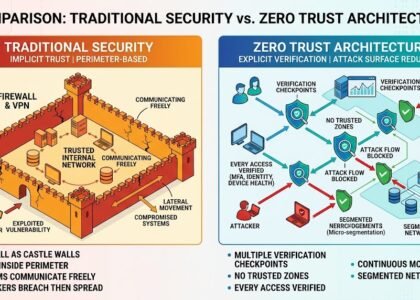
Zero-Trust Architecture
Modern security model that assumes MFA bypass is possible:
- Verify every access: Don’t trust network location
- Least privilege: Users only access resources they need
- Continuous monitoring: Real-time analysis of all activities
- Implicit trust = zero: Never assume user is legitimate based on MFA alone
Detection: How to Identify MFA Bypass Attacks
Technical Indicators
Monitor these signs in your security logs:
- Successful login followed immediately by credential reset attempt → Session hijacking
- Multiple failed MFA attempts then success → Push notification fatigue or credential stuffing
- Login from impossible geographic location → Account compromise (possibly through MFA bypass)
- VPN or proxy login followed by internal system access → Lateral movement after compromise
- Authenticator app access from multiple devices → Malware exfiltrating MFA codes
- Rapid email forwarding rule creation → Account takeover hiding evidence
Behavioral Indicators
Watch for these user behaviors:
- Users reporting unexpected MFA notifications → Real-time phishing or push fatigue attack
- Reports of account access at odd hours → Successful MFA bypass
- Unexpected changes to account settings → Lateral movement after compromise
- Employees complaining about excessive MFA prompts → Push notification fatigue attack
- Reports of phishing emails with high credibility → Real-time credential phishing underway
FAQ: MFA Bypass Questions
Q: If MFA bypasses are this easy, should I bother using it?
A: Absolutely use MFA. While MFA bypass is possible, it requires significantly more skill and resources than simple password attacks. MFA stops 99% of automated attacks. Combine it with other layers for comprehensive protection.
Q: Which is more secure—SMS MFA or authenticator apps?
A: Authenticator apps are more secure than SMS (which is vulnerable to SIM swapping). Hardware keys are most secure. Optimal: Hardware keys for sensitive accounts, authenticator apps for others.
Q: Can enterprise MFA systems be bypassed?
A: Yes. Enterprise systems like Okta, Azure AD, and Okta are regularly targeted. Implement conditional access, session monitoring, and zero-trust principles alongside MFA.
Q: How do I know if my MFA was bypassed?
A: Look for account activity you don’t recognize, unexpected password reset emails, or access from unfamiliar locations. Enable login alerts and review session history regularly.
Q: Is MFA enough for banking/financial systems?
A: No. Financial systems should require additional layers: hardware keys, continuous authentication, step-up verification for large transactions, and real-time transaction monitoring.
External Security Research
Security organizations have published extensive research on MFA bypass techniques:
Microsoft Threat Intelligence regularly publishes research on MFA bypass attacks, including analysis of phishing campaigns that successfully capture MFA tokens</cite>. Their research shows that while MFA is highly effective at preventing automated attacks, targeted campaigns can bypass it through social engineering.
CISA (Cybersecurity & Infrastructure Security Agency) has published detailed advisories on MFA bypass techniques, recommending hardware security keys and continuous authentication as defenses</cite>.
Gartner research indicates that by 2025, 60% of enterprises will implement hardware security keys for high-risk users, up from 5% today, as organizations recognize MFA bypass risks</cite>.
External Links:
- Microsoft Security Research – MFA Bypass
- CISA – Multi-Factor Authentication
- Gartner: Securing Zero Trust Access
Conclusion: MFA is Essential But Not Foolproof
MFA bypass attacks have proven that multi-factor authentication, while critical, is not a complete solution to account security. From Okta’s real-time credential phishing to LastPass’s session hijacking, attackers consistently find ways around MFA.
The path forward requires:
- Deploy MFA everywhere (it stops 99% of attacks)
- Use hardware keys for sensitive accounts (resistant to phishing)
- Implement conditional access (detect impossible logins)
- Monitor continuously (catch MFA bypass when it happens)
- Adopt zero-trust architecture (don’t trust authentication alone)
- Train users (they’re often the target in social engineering)
- Have incident response ready (assume MFA bypass will happen)
Organizations that combine MFA with additional security layers reduce account compromise risk by up to 99.99%. The key is recognizing that MFA bypass is possible and planning accordingly.
MFA is not the destination of security—it’s the beginning.
Try out this Quiz
Find more Cyber Security articles or contact us to learn how to better protect yourself, your business, and your digital environment from modern cyber threats. Also, explore How attackers bypass MFA to commit CEO fraud
This article is published exclusively for informational and educational purposes. Its goal is to enhance cybersecurity awareness, inform users, and help prevent modern digital threats.The information presented is not intended for malicious use or to promote illegal activities.