Zero Trust Architecture: Modern Security Framework That Stops All Attack Types
Traditional security operates on a dangerous assumption: if you’re inside the network, you’re trusted. This assumption has shaped cybersecurity for decades. Administrators built firewalls to protect the perimeter. Once inside, systems trusted each other. Employees could access most files. Networks assumed that breaching the outer wall was the hard part. Once past the firewall, attackers had freedom. This model was never perfectly secure, but it was workable when networks were small and closed. Today, with cloud services, remote work, mobile devices, and sophisticated attackers, this model has catastrophically failed. The solution is Zero Trust Architecture, a fundamental rethinking of security that trusts nothing and verifies everything.
Understanding Traditional Security: Why It Fails Today
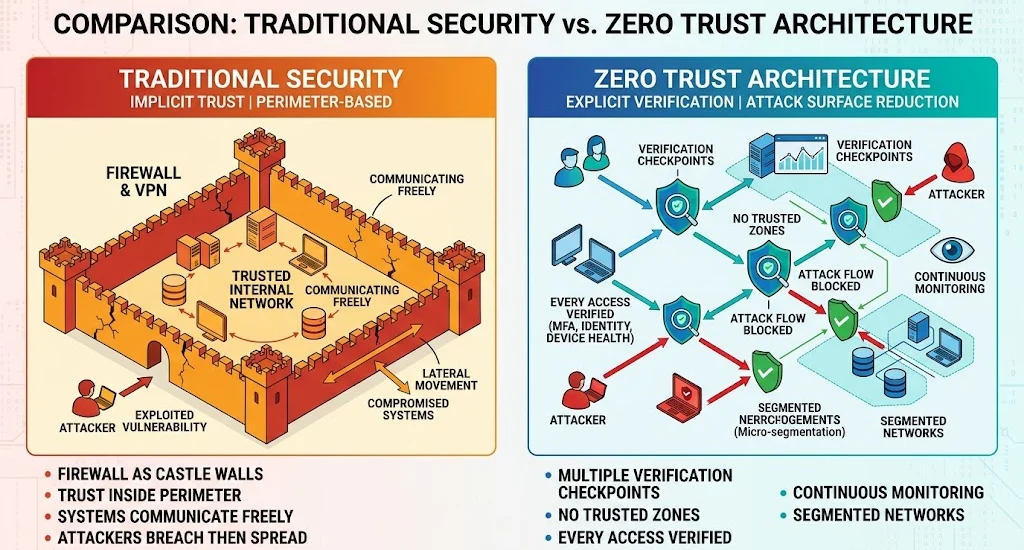
Traditional security architecture resembles a medieval castle. Build strong walls around the perimeter. Once inside, the castle’s inhabitants move freely. This model made sense historically. Castles protected against external invaders. Inside the walls, people were relatively safe. Networks adopted this metaphor with firewalls as perimeter walls. A strong firewall kept attackers out. Inside, systems trusted each other.
This approach worked adequately when networks were straightforward. A company had physical offices with computers on-site. Employees worked in offices and connected to the network from there. Administrators controlled which systems were on the network. They could audit network activity. They could trust that devices on the network belonged to the organization.
Modern reality shattered these assumptions. Employees work from coffee shops, airports, and home offices on WiFi networks you don’t control. Cloud services host critical applications outside your network. Third-party vendors need access to your systems. Contractors connect from anywhere. Mobile devices connect intermittently. The network perimeter became blurred and permeable. You can’t identify who’s inside your network anymore.
Simultaneously, attackers got better at moving laterally. Once inside a network, they don’t need firewall access to critical systems. They move from compromised workstation to workstation, escalating privileges, exploring, stealing data. They attack the inside, where traditional security assumes trust. Ransomware spreads inside the network because systems trust each other. Data exfiltration happens over internal network connections. By the time the perimeter firewall sees suspicious traffic, damage is already done.
The result is predictable: sophisticated attacks breach the perimeter regularly. Traditional security stops some attacks but not the ones that matter most. The perimeter-based model is obsolete.
What Is Zero Trust Architecture?
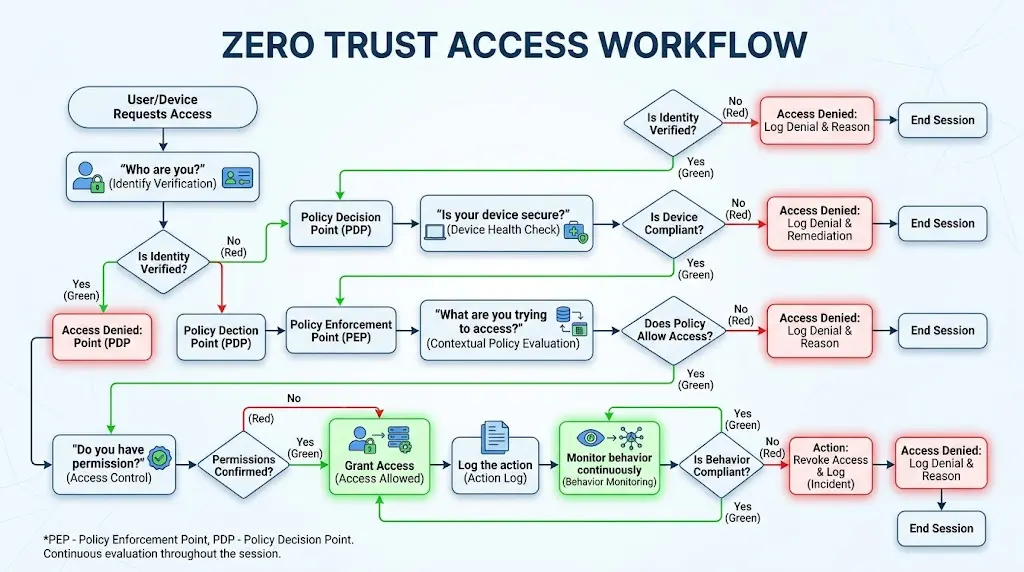
Zero Trust represents a complete philosophical shift. Instead of trusting anything inside the network, Zero Trust trusts nothing and verifies everything. Every access request is treated as potentially hostile. Every user must prove they are who they claim. Every device must prove it’s healthy. Every application must prove it should access data. Trust is never assumed. It’s continuously earned.
The core principle is simple but revolutionary: assume breach. Assume that attackers are already inside your network. Design your systems assuming this worst-case scenario. This mindset shift changes everything. You don’t try to stop attackers at the perimeter, you can’t, because perimeters are porous. Instead, you make the interior hostile to attackers. You create barriers between systems. You monitor all internal traffic. You limit what any single compromised system can access.
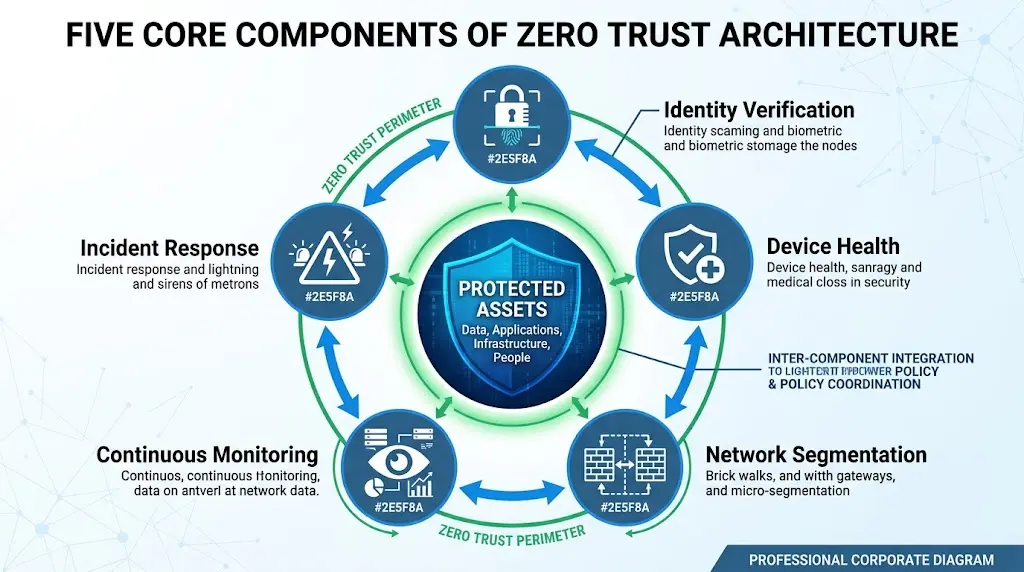
Zero Trust architecture has several key components working together. First is identity verification. Every user must authenticate strongly before accessing anything. Not just with passwords—with multi-factor authentication proving they are who they claim. Second is device health verification. Every device accessing the network must prove it’s secure, up-to-date, and compliant with security policies. A device with outdated software can’t access sensitive systems, regardless of who’s using it. Third is network segmentation. Instead of one big trusted network, you create isolated segments. Systems in one segment can’t directly access systems in another. Traffic between segments passes through security checkpoints. Fourth is continuous monitoring. All traffic is logged and analyzed. Unusual access patterns trigger alerts. Attackers can’t move silently, every move is watched.
How Zero Trust Prevents Every Attack Type You’ve Already Learned
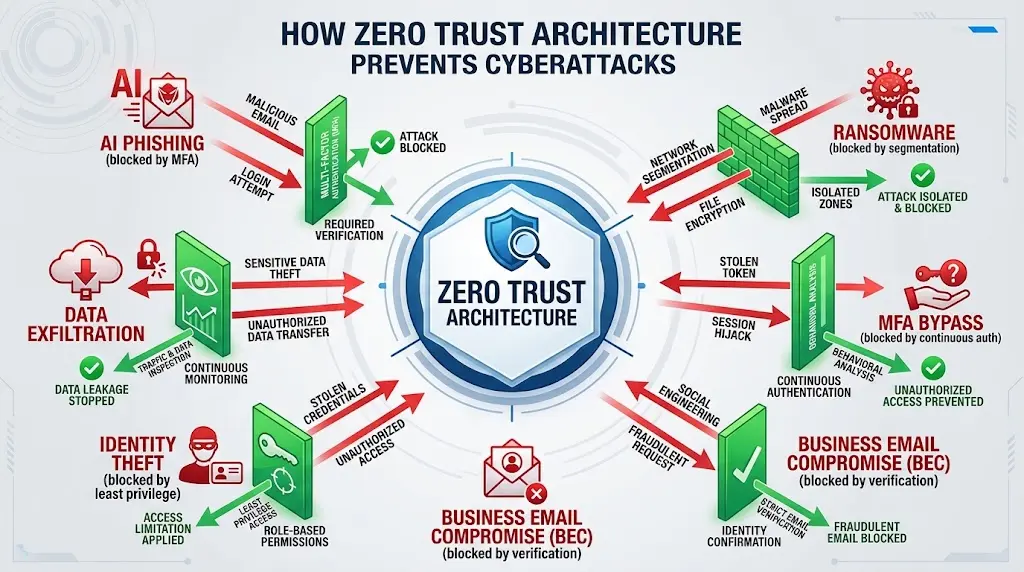
Zero Trust is powerful precisely because it prevents all attack types simultaneously. Let’s examine how it protects against each threat you’ve already learned.
AI Phishing and credential theft are Zero Trust’s first line of defense. An attacker phishes an employee and steals credentials. Traditional security is breached—the attacker can log in. But Zero Trust doesn’t trust passwords alone. Multi-factor authentication is required. The attacker might have the password, but they don’t have the employee’s phone or authentication app. They can’t complete authentication. The stolen credential is useless. Even if they somehow bypass MFA, the employee’s device must pass health checks. If the employee’s computer has malware or is out-of-date, it can’t access the network regardless. Phishing attacks fail at the authentication stage.
Business Email Compromise attacks attempt to impersonate executives and manipulate employees into transferring money or revealing data. Zero Trust protects with several mechanisms. First, every internal email is inspected—unusual communication patterns trigger alerts. Second, financial transactions require verification beyond just email authorization. Humans, not just email, verify requests. Third, data access is limited—even executives can’t freely access all data. Access to sensitive information requires additional authentication and logging. BEC attacks that traditionally work—convincing an employee to act based on spoofed email, become dramatically harder when every request is verified and every action is logged.
MFA Bypass attacks attempt to compromise credentials and then bypass multi-factor authentication through social engineering or technical exploitation. Zero Trust assumes MFA might be bypassed. It layers additional verification on top. Zero Trust uses continuous authentication—not just verifying once at login, but continuously throughout the session. Unusual behavior triggers re-authentication. If a user normally accesses data from their office but suddenly accesses from another country, that’s suspicious. Zero Trust catches anomalies that single-factor or even traditional MFA can’t.
Ransomware deployment requires lateral movement through networks. Zero Trust severely restricts this. Even if ransomware infects one workstation, it can’t move to the file server without authentication to that server. Network segmentation means the ransomware’s spread is limited. The file server requires authentication proving the access is legitimate. Ransomware can’t just spread to wherever it wants—every move faces barriers. Additionally, backups are protected with separate authentication and network isolation. Ransomware that compromises production systems can’t automatically access backups.
Identity theft and data exfiltration require moving data off systems. Zero Trust creates friction here. Access to sensitive data is logged. Unusual data access patterns trigger alerts. Moving large amounts of data to external locations requires authentication and creates audit trails. An attacker might steal some data, but they can’t steal silently. They can’t exfiltrate gigabytes without triggering alerts.
Detected attacks can be contained faster. Because all traffic is logged and monitored, Zero Trust shows exactly what an attacker accessed, when, and how. Investigation and containment are faster. Backups are protected, so recovery is possible. Incident response is dramatically faster when you know exactly what happened.
Core Components of Zero Trust Implementation
Implementing Zero Trust is complex, but the core components are clear.
First is identity and access management. Every user has a unique identity. Access is based on role, device health, and context. An executive might access financial data from their office workstation but not from an airport WiFi on their personal phone. Context matters. The system verifies every access request against policy.
Second is device management. Every device connecting to the organization is enrolled in management. The organization can verify the device is secure—software is updated, antivirus is running, encryption is enabled. Devices that don’t meet security standards are blocked or restricted. This prevents compromised devices from accessing sensitive systems.
Third is network segmentation. Instead of one big network, you create isolated segments. Finance systems are in one segment, engineering in another, customer data in yet another. Systems in different segments can’t directly communicate. Traffic between segments passes through security checkpoints that verify it’s legitimate. This dramatically limits lateral movement.
Fourth is continuous verification. Users don’t authenticate once and then have unlimited access. Access is continuously verified. Unusual behavior triggers re-authentication. An attacker who compromises an account can’t maintain access indefinitely—anomalies trigger alerts.
Fifth is comprehensive logging and monitoring. Every access attempt, every data transfer, every configuration change is logged. Analysts review logs for suspicious patterns. Automated systems analyze logs for anomalies. Nothing happens silently.
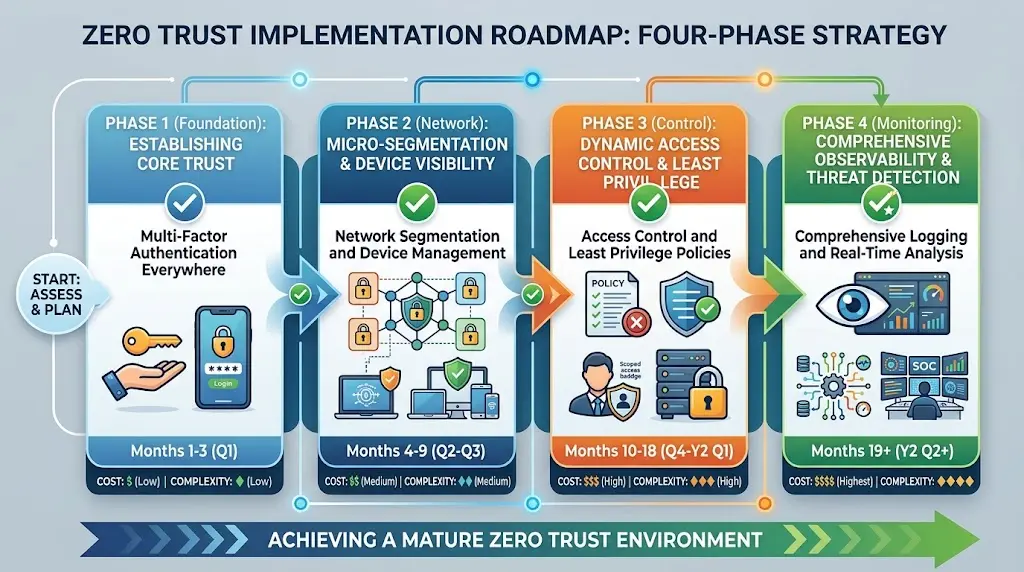
Implementing Zero Trust: Where to Start
Complete Zero Trust implementation takes years. Most organizations implement it gradually. But you can start immediately with high-impact measures.
First, enable multi-factor authentication everywhere. This is the single highest-impact Zero Trust measure. MFA prevents most credential compromise attacks. Implement it for email, financial systems, administrative access, and any application with sensitive data. For individuals, enable MFA on email and banking immediately.
Second, establish network segmentation. For organizations, identify critical systems—financial systems, customer data, intellectual property—and isolate them on separate network segments. For individuals, this means separating your personal devices from guest devices and work devices. Use different WiFi networks or at least different accounts.
Third, implement device management. Organizations should use Mobile Device Management (MDM) to verify all devices are secure. Individuals should keep devices updated, run antivirus, and enable encryption.
Fourth, establish access controls. Implement the principle of least privilege: users have access only to what they need. An accountant doesn’t need access to source code repositories. A developer doesn’t need access to financial records. Limit access by role and need.
Fifth, begin logging and monitoring. For organizations, implement Security Information and Event Management (SIEM) systems that centralize logging and analyze for threats. For individuals, enable login notifications on important accounts so you know when access occurs.
The Business Case for Zero Trust
Zero Trust seems like additional overhead—more authentication steps, more monitoring, more complexity. The business case is clear anyway.
First, breach containment is faster. When zero trust practices detect an intrusion, the organization knows exactly what was accessed and can contain the breach immediately. Without Zero Trust, breaches go undetected for months. By the time discovery happens, massive damage is done. Zero Trust reduces breach detection time from 207 days to days or hours.
Second, recovery is faster. Backups are protected. Systems are segmented. Even if an attacker compromises systems, data can be recovered quickly. Organizations with Zero Trust recover from ransomware in days. Organizations without it spend months or lose data permanently.
Third, regulatory compliance becomes easier. Most compliance frameworks (HIPAA, PCI-DSS, SOC 2) require access controls, logging, and multi-factor authentication. Zero Trust implements these requirements. Compliance audits become simpler.
Fourth, customer trust increases. Organizations can honestly state they have modern security practices. They can demonstrate comprehensive protection. Customers increasingly demand Zero Trust security from vendors.
Fifth, insider threat detection improves. Zero Trust monitors all access. Detecting when employees access data outside their normal patterns or roles becomes possible. Preventing insider threats—either malicious insiders or compromised employee accounts, becomes feasible.
Zero Trust Is Not Perfection
Zero Trust doesn’t make breaches impossible. Determined, well-resourced attackers can still penetrate systems with Zero Trust. But Zero Trust makes attacks dramatically harder. It limits damage from breaches. It speeds detection and recovery. It transforms cybersecurity from reactive (trying to prevent breaches) to proactive (assuming breaches will happen and preparing for recovery).
Zero Trust also introduces complexity. More authentication steps means slightly longer access times. Monitoring everything requires infrastructure and expertise. Implementing Zero Trust requires investment. The benefits far outweigh the costs, but the costs are real.
Zero Trust is not a product you buy. It’s an architecture and mindset. You implement it through people, processes, and technology working together. It’s not a destination you reach but a continuous practice of verification and monitoring.
The Future of Security Is Trust Nothing
Traditional perimeter-based security is dead. Every major security organization, NIST, NSA, Gartner, now recommends Zero Trust. Every serious organization is implementing it. The question isn’t whether to adopt Zero Trust. It’s how quickly.
For individuals, Zero Trust principles are simple to implement: strong unique passwords, multi-factor authentication, software updates, regular backups, and careful attention to unusual account activity. These practices follow Zero Trust principles: verify everything, assume nothing is safe, prepare for the worst.
For organizations, Zero Trust is more complex but the direction is clear. Start with high-impact measures, MFA, network segmentation, logging, and build from there. The investment is justified by the dramatic reduction in breach impact.
The organizations that suffer catastrophic breaches in the next five years will almost certainly be those still operating with traditional perimeter-based security. Those that implement Zero Trust will detect attacks faster, contain them quicker, and recover more completely. Zero Trust isn’t the future of security. It’s the present. The only question is how quickly you’ll adopt it.
External Links: NIST Cybersecurity Framework – Gartner Zero Trust – NSA Zero Trust