Introduction: Why Cybersecurity Concerns Everyone
In today’s hyper-connected world, the internet is no longer just a tool, but the very fabric of our daily lives. We use it to communicate, manage our finances, work remotely, shop, and entertain ourselves. However, this unprecedented convenience comes with a significant caveat: the digital landscape is fraught with dangers. Cybersecurity is no longer a niche topic reserved for IT professionals or large corporations. It is a fundamental life skill that every individual must cultivate to protect their digital identity, their privacy, and their financial well-being. Online security is now essential for everyone.
The Digital Transformation of Everyday Life and its Risks
The transition from analog to digital has been rapid and comprehensive. Consider the vast amount of personal data we entrust to digital platforms. Our smartphones contain our most personal conversations, our location history, and our health data. Our computers store sensitive documents, tax returns, and family photos. We rely on cloud services to back up our lives, assuming they are secure. This digital transformation has undoubtedly improved efficiency and connectivity, but it has also created a vast, interconnected web of potential vulnerabilities.
Every time we create an account, make an online purchase, or even just browse a website, we leave a digital footprint. This footprint consists of data points that, when combined, can create a detailed picture of who we are, what we like, and what we do. In the wrong hands, this information can be used for malicious purposes, ranging from targeted advertising to identity theft and financial fraud. Protection from hackers begins with understanding this footprint.
The Illusion of Invulnerability: Why No One Is Safe
A common misconception among everyday users is the belief that they are not important enough to be targeted by cybercriminals. “Why would a hacker be interested in my personal emails or my small bank account?” is a frequent refrain. This illusion of invulnerability is dangerous. Cybercriminals do not always target specific individuals. They often cast a wide net, looking for easy targets and “low-hanging fruit.”
Automated tools and bots constantly scan the internet for vulnerable devices, weak passwords, and outdated software. If your digital defenses are weak, you become a target of opportunity, regardless of your status or wealth. Furthermore, personal data has inherent value on the dark web. A stolen email address, a compromised social media account, or a leaked credit card number can be sold and used in various fraudulent schemes. Therefore, assuming you are too insignificant to be hacked is a risky gamble that can lead to serious consequences. Online protection requires constant vigilance.
The Real Consequences of Cyberattacks
The impact of a cyberattack extends far beyond the digital realm; it can have profound real-world consequences. When personal data is compromised, the effects can be devastating and long-lasting.
Financial loss is perhaps the most immediate and tangible consequence. Cybercriminals can drain bank accounts, make unauthorized purchases, or use stolen identities to open new lines of credit. Recovering from financial fraud can be a long and stressful process, often requiring extensive communication with banks, credit bureaus, and law enforcement agencies.
Beyond the financial implications, cyberattacks can cause significant emotional distress and reputational damage. Identity theft can destroy an individual’s credit score, making it difficult to secure loans, rent an apartment, or even find employment. The breach of personal photos or private communications can lead to blackmail or public humiliation. The loss of irreplaceable digital memories, such as family photos or important documents, due to a ransomware attack can be painful.
Empowering the Everyday User: The Role of Cybersecurity
The goal of cybersecurity awareness is not to instill fear, but to empower individuals. By understanding the risks and learning how to implement basic security measures, everyday users can significantly reduce their vulnerability to cyber threats. Cybersecurity is a shared responsibility. Just as we lock our doors and look both ways before crossing the street in the physical world, we must adopt similar habits in the digital world.
This article is designed to be your guide in navigating the complex landscape of cybersecurity. It will demystify technical jargon, explain common threats like phishing and social engineering, and provide practical, actionable advice on how to protect your devices, networks, and accounts. As we progress through the chapters, we will delve into more advanced concepts, equipping you with the knowledge and tools necessary to become a resilient and secure digital citizen. The journey to strong cybersecurity begins with awareness, and the first step is to recognize that your digital security is in your hands.
Core Cybersecurity Concepts: The Foundation of Protection
Before delving into specific threats and protective measures, it is essential to establish a common understanding of the fundamental concepts that underpin cybersecurity. This chapter will introduce key terminology and foundational principles that will serve as a basis for more detailed discussions in subsequent sections.
Confidentiality, Integrity, and Availability (CIA Triad)
The CIA Triad is a fundamental model in information security, guiding policies and practices for securing information systems. It represents three core principles that are crucial for information protection:
•Confidentiality: This principle ensures that information is accessible only to authorized individuals. It involves preventing unauthorized disclosure of sensitive data. Measures to ensure confidentiality include encryption, access controls (passwords, two-factor authentication – MFA), and data classification.
•Integrity: Integrity ensures that information is accurate, complete, and has not been tampered with or altered in an unauthorized manner. It involves protecting data from unauthorized modification or destruction. Measures include data backups, checksums, digital signatures, and access controls that limit modification rights.
•Availability: Availability ensures that authorized users can access information and resources when needed. It involves maintaining operational systems and preventing service disruptions. Measures include redundant systems, disaster recovery plans, regular maintenance, and protection against denial-of-service (DoS) attacks.
These three principles are interconnected, and a breach in one can often affect the others. For example, a ransomware attack (affecting availability) can also compromise confidentiality if attackers exfiltrate data before encrypting it.
Threats, Vulnerabilities, and Risks in Cybersecurity
Understanding the distinction between threats, vulnerabilities, and risks is crucial for effective cybersecurity:
•Threat: A threat is any potential danger that could exploit a vulnerability to breach security and cause harm. Threats can be intentional (e.g., hackers, malware, phishing) or unintentional (e.g., human error, natural disasters, system failures).
•Vulnerability: A vulnerability is a weakness or flaw in a system, application, or process that can be exploited by a threat. Examples include outdated software, weak passwords, misconfigured firewalls, or a lack of user awareness.
•Risk: Risk is the probability of loss or damage resulting from a threat exploiting a vulnerability. It is often expressed as the likelihood of a threat occurring multiplied by the impact if it does. Cybersecurity aims to identify, assess, and mitigate risks to an acceptable level.
Malware: The Invisible Enemies of Digital Security
Malware (malicious software) is a broad term that encompasses any software designed to cause harm, disrupt operations, gain unauthorized access, or exploit a computer system, network, or data. Common types of malware include:
•Viruses: Self-replicating programs that attach themselves to legitimate files, requiring user action to spread.
•Worms: Self-replicating programs that spread across networks without human intervention.
•Trojans: Malicious programs disguised as legitimate software, tricking users into installing them.
•Ransomware: Malware that encrypts a victim’s files and demands a ransom payment for their decryption.
•Spyware: Software that secretly monitors and collects information about a user’s activities.
•Adware: Software that automatically displays unwanted advertisements.
•Rootkits: Collections of tools that allow an attacker to maintain hidden access to a system.
Phishing and Social Engineering: The Art of Digital Deception
These are human-centric attacks that exploit psychological manipulation rather than technical vulnerabilities:
•Phishing: A type of social engineering attack where attackers attempt to trick individuals into revealing sensitive information (e.g., usernames, passwords, credit card details) by impersonating a trustworthy entity in electronic communication, such as emails or text messages.
•Social Engineering: The psychological manipulation of people into performing actions or divulging confidential information. It relies on human trust, curiosity, or fear, rather than technical hacking. Phishing is a common form of social engineering.
Encryption: The Cornerstone of Digital Security
Encryption is the process of converting information or data into a code to prevent unauthorized access. It is a fundamental tool for ensuring confidentiality and integrity.
•How it Works: Encryption uses an algorithm and a key to transform plaintext (readable data) into ciphertext (unreadable data). Only someone with the correct key can decrypt the ciphertext back into plaintext.
•Types of Encryption:
•Symmetric Encryption: Uses the same key for both encryption and decryption. Fast, but requires secure key exchange.
•Asymmetric (Public-Key) Encryption: Uses a pair of keys: a public key for encryption and a private key for decryption. The public key can be widely shared, while the private key remains secret. This is the basis for secure communication over the internet (e.g., HTTPS).
•Everyday Use: Encryption is used in various aspects of our digital lives, from securing online transactions (HTTPS) and email protection to encrypting hard drives and cloud storage.
Authentication and Authorization: Who Has Access?
These two concepts are critical for controlling access to systems and data:
•Authentication: The process of verifying the identity of a user or system. It answers the question, “Are you who you say you are?” Common authentication methods include passwords, biometrics (fingerprints, facial recognition), and two-factor authentication (MFA).
•Authorization: The process of determining what an authenticated user or system is permitted to do. It answers the question, “What are you allowed to access or do?” Authorization is typically managed through access control lists (ACLs) or role-based access control (RBAC).
Digital Footprint and Privacy: Manage Your Online Presence
Our digital footprint is the trail of data we leave as we use the internet. This includes everything from social media posts and online purchases to browsing history and location data. Managing our digital footprint is crucial for protecting our privacy.
•Active Digital Footprint: Data we intentionally share, such as social media posts, online reviews, or information provided in forms.
•Passive Digital Footprint: Data collected without our explicit knowledge, such as IP addresses, browsing history tracked by cookies, and location data from our devices.
•Privacy: The right to control who has access to our personal information and how it is used. Cybersecurity measures often aim to enhance privacy by limiting the collection and sharing of personal data.
Digital Identity and Protection: Your Shield Online
In the digital age, our digital identity is just as critical as our physical one. It encompasses all the information that defines us online: our usernames, passwords, email addresses, social media profiles, online banking credentials, and even our browsing habits. Protecting this digital identity is paramount, as its compromise can lead to significant financial, reputational, and emotional harm. This chapter will explore what constitutes our digital identity and outline key strategies for its robust protection.
What is Digital Identity?
Digital identity is the unique set of electronically verifiable attributes and characteristics that represent an individual or entity in the digital world. It is not a single piece of information, but a composite of various data points:
•Authentication Credentials: Usernames, passwords, PINs, biometric data (fingerprints, facial scans) used to prove who we are.
•Personal Information: Name, address, date of birth, phone number, email address, national identification numbers, and financial details.
•Online Activities: Browsing history, search queries, social media posts, comments, likes, online purchases, and downloaded content.
•Device Information: IP addresses, device identifiers, operating system details, and installed software.
•Behavioral Data: Patterns of online behavior, such as typing speed, mouse movements, and application usage.
Every interaction we have online contributes to our digital identity. From logging into an email account to making a purchase on an e-commerce website, we are constantly emitting information that shapes our online persona.
The Importance of Strong Passwords
Passwords remain the first and often the only line of defense for many of our online accounts. A weak password is an open invitation for cybercriminals. Creating and managing strong passwords is a fundamental aspect of digital identity protection.
Characteristics of a Strong Password:
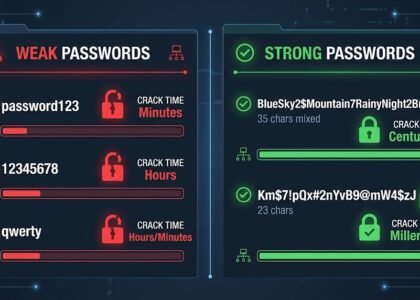
•Length: Aim for at least 12-16 characters.
•Complexity: Include a mix of uppercase and lowercase letters, numbers, and symbols.
•Uniqueness: Do not reuse the same password for multiple accounts. If one account is compromised, all your other accounts will also be vulnerable.
•Avoid Personal Information: Do not use easily guessable information such as names, birth dates, or common words.
Multi-Factor Authentication (MFA): An Extra Layer of Security
Multi-factor authentication (MFA), also known as two-factor authentication (2FA), adds a critical layer of security to your online accounts. It requires two or more verification elements to gain access, making it much harder for hackers to get in, even if they have your password. These elements fall into three categories:
•Something you know: Your password.
•Something you have: A code sent to your phone, an authenticator app, or a physical security key.
•Something you are: Biometric data, such as a fingerprint or facial recognition.
Managing Your Digital Footprint
Our digital footprint is constantly growing, and managing it is essential for protecting our privacy and preventing identity theft. Every piece of information we share online, intentionally or unintentionally, can be collected, analyzed, and potentially misused.
Steps to Manage Your Digital Footprint:
•Review Privacy Settings: Regularly check and adjust privacy settings on all your social media platforms, email services, and other online accounts. Limit who can see your posts, photos, and personal information.
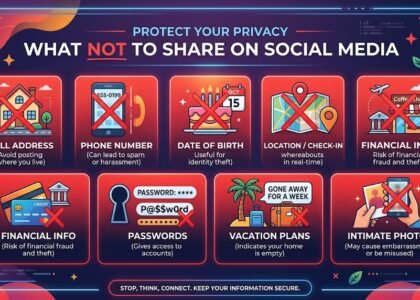
•Be Mindful of What You Share: Think before you post. Avoid sharing overly personal information, such as your home address, phone number, travel plans, or sensitive family details. This information can be used by social engineers or even for physical crimes.
•Limit App Permissions: On your smartphone and computer, review the permissions granted to applications. Revoke access to features (e.g., location, microphone, camera, contacts) that are not essential for the app’s functionality.
•Use Privacy-Focused Browsers and Search Engines: Consider using web browsers (e.g., Brave, Firefox Focus) and search engines (e.g., DuckDuckGo) that prioritize user privacy and block trackers.
•Delete Old Accounts: If you no longer use an online service, delete the account to remove your associated data. If deletion is not possible, at least remove as much personal information as you can.
•Be Cautious with Public Wi-Fi: Public Wi-Fi networks are often insecure. Avoid conducting sensitive transactions or sharing personal information on public Wi-Fi unless you are using a VPN.
Identity theft occurs when someone uses your personal information (e.g., name, social security number, credit card number) without your permission to commit fraud or other crimes. Protecting your digital identity is a primary defense against this threat.
Measures to Prevent Identity Theft:
•Shred Sensitive Documents: Destroy physical documents containing personal information before discarding them.
•Monitor Your Financial Statements: Regularly check your bank and credit card statements for any unauthorized transactions.
•Check Your Credit Report: Periodically obtain a copy of your credit report to check for suspicious activity or accounts opened in your name.
•Be Wary of Unsolicited Requests: Never provide personal information over the phone, email, or text message unless you initiated the communication and are certain of the recipient’s legitimacy.
•Secure Your Mail: Use a locked mailbox or consider using a P.O. box for sensitive correspondence.
By diligently implementing these practices, you can significantly strengthen your digital identity, making it much harder for cybercriminals to compromise your online presence and exploit your personal information. Protecting your digital self is an ongoing commitment, but essential for safely and confidently navigating the modern digital world.
Phishing: The Art of Digital Deception and How to Protect Yourself
Of all the cyber threats faced by everyday users, phishing remains one of the most prevalent, effective, and constantly evolving. It is a form of digital deception that relies not on breaching complex firewalls or breaking encryption, but on manipulating human psychology. By understanding the mechanisms of phishing and learning to recognize its signs, you can significantly reduce your risk of falling victim to these attacks.
What is Phishing?
Phishing is a cyberattack where criminals impersonate a legitimate organization or a trustworthy individual to trick victims into revealing sensitive information, such as login credentials, credit card numbers, or personally identifiable information. The term “phishing” is a play on the word “fishing,” as attackers cast out “bait” (deceptive messages) hoping a user will “bite” (click a link, open an attachment, or provide information).
These attacks are typically delivered through electronic communication channels, most commonly via email, but increasingly through SMS (smishing), phone calls (vishing), and even social media messages. The goal is almost always financial gain, either directly by stealing money or indirectly by selling stolen data on the dark web.
The Anatomy of a Phishing Attack
A typical phishing attack follows a predictable pattern, designed to create a sense of urgency, fear, or curiosity that overrides the victim’s critical thinking.
The attacker begins by crafting a message that appears to come from a reputable source. This could be a bank, a popular online retailer, a government agency, or even a colleague. The message usually contains a compelling narrative. For example, it might claim there’s a problem with your account, a suspicious login attempt was detected, you’ve won a prize, or an invoice is overdue.
Crucially, the message includes a call to action. It will urge you to click a link to resolve the issue, download an attachment containing an “invoice,” or reply with your personal details. If you click the link, you are led to a fraudulent website that closely mimics the legitimate one. This fake website is designed to collect any information you enter, such as your username and password. Once you submit your details, the attacker records them and often redirects you to the real website to avoid immediate suspicion.
Recognizing the Red Flags of Phishing
While phishing attacks are becoming more sophisticated, they often contain subtle errors or inconsistencies that can give them away. Developing a critical eye is your best defense.
One of the most common red flags is a generic greeting. Legitimate organizations typically address you by name, whereas phishing emails often use generic terms like “Dear Customer” or “Dear Member.” Another key indicator is a sense of urgency or a threat. Attackers want you to act quickly without thinking. Phrases like “Immediate Action Required,” “Your account will be suspended,” or “Last Warning” are designed to induce panic.
Always check the sender’s email address. While the displayed name might say “PayPal Support,” the actual email address might be something entirely different, such as support@paypal-security-update.com or a random string of characters. Similarly, hover your mouse cursor over any links in the email without clicking. This will reveal the true destination URL. If the URL looks suspicious, contains misspellings of the legitimate domain (e.g., www.paypa1.com), or uses an entirely different domain, do not click.
Poor grammar and spelling mistakes are also common in phishing emails, especially those originating from non-native speakers. While legitimate companies occasionally make mistakes, a message riddled with typos is highly suspicious. Finally, be extremely wary of unexpected attachments, particularly those with extensions like .exe, .zip, or .scr, as these often contain malware.
Types of Phishing: Beyond Email
Phishing is not a one-size-fits-all attack. Cybercriminals employ various techniques to target different audiences.
•Spear Phishing: A highly targeted form of phishing. Instead of sending generic emails to thousands of people, attackers research a specific individual or organization and craft a personalized message. They might use information gathered from social media or corporate websites to make the email seem highly credible, perhaps mentioning a recent project or a mutual acquaintance.
•Whaling: A specialized type of spear phishing that targets high-profile individuals, such as CEOs, CFOs, or other senior executives. The goal is often to steal highly sensitive corporate data or to authorize large, fraudulent financial transactions. These attacks are meticulously planned and executed.
•Smishing (SMS Phishing): Uses text messages instead of emails. These messages often claim to be from a delivery service (e.g., “Your package is delayed, click here to reschedule”), a bank, or a government agency. Because people tend to trust text messages more than emails and often read them on smaller screens where URLs are harder to verify, smishing can be highly effective.
•Vishing (Voice Phishing): Involves attackers calling victims over the phone. They might impersonate bank representatives, technical support, or government officials, using social engineering tactics to extract personal information or convince the victim to transfer money.
Defense Against Phishing: Technical Tools and Behavioral Changes
Protection against phishing requires a combination of technical tools and behavioral changes.
First and foremost, cultivate a healthy skepticism. Never automatically trust an unsolicited email, text message, or phone call, especially if it asks for personal information or urges immediate action. If you receive a suspicious message claiming to be from an organization you deal with, do not click on links or use contact information provided in the message. Instead, independently verify the request by going directly to the organization’s official website or calling their verified customer service number.
Employ technical defenses. Ensure your email provider’s spam filters are active and effective. Use a reputable antivirus and anti-malware solution that includes web protection to block known phishing sites. Most importantly, enable Multi-Factor Authentication (MFA) on all your critical accounts. Even if you accidentally fall victim to a phishing scam and reveal your password, MFA will prevent the attacker from gaining access to your account without the second verification factor.
By understanding the tactics phishers use and remaining vigilant, you can transform yourself from a potential victim into a difficult target. Phishing relies on human error. By educating yourself, you remove the attacker’s biggest advantage.
Social Engineering: Manipulating the Human Factor in Cybersecurity
While technical vulnerabilities in software and hardware are often the focus of cybersecurity discussions, the human element remains the weakest link in the security chain. Social engineering is the art of manipulating people into performing actions or divulging confidential information. It exploits human psychology, trust, curiosity, fear, and even greed, rather than relying on complex hacking techniques. Understanding social engineering is crucial because even the strongest technical defenses can be bypassed if an attacker successfully manipulates an individual.
What is Social Engineering?
Social engineering is a non-technical intrusion method that relies on human interaction and deception. Attackers use psychological tricks to gain access to systems, data, or physical locations. Unlike malware or network exploits, social engineering attacks do not necessarily involve malicious code. They involve manipulating the victim into making a security mistake or giving away sensitive information.
The core principle behind social engineering is building trust or creating a sense of urgency or fear, prompting the victim to act against their own interests. Attackers often impersonate trustworthy individuals (e.g., IT support, senior executive, government official) or organizations (e.g., bank, utility company) to make their requests seem legitimate.
Common Social Engineering Tactics
Social engineers use a variety of tactics, often combining them to increase their chances of success. Some of the most common include:
•Pretexting: Involves creating a fabricated scenario (a “pretext”) to engage a target and extract information. The attacker might pretend to be a researcher conducting a survey, a customer service representative verifying account details, or an auditor checking compliance. The key is to create a believable story that justifies asking for sensitive information.
•Baiting: This tactic involves offering something enticing to the victim, such as a free download, a tempting offer, or a USB drive left in a public place labeled “Confidential Company Data.” When the victim takes the bait (e.g., plugs in the USB drive, clicks the malicious link), their system is compromised with malware.
•Quid Pro Quo: Meaning “something for something,” this tactic involves promising a benefit in exchange for information or an action. For example, an attacker might call an employee, claiming to be from IT support, and offer to fix a non-existent IT problem in exchange for their login credentials.
•Tailgating (or Piggybacking): This is a physical social engineering tactic where an unauthorized person gains access to a restricted area by closely following an authorized person who has just used their access credentials. The attacker might pretend to be an employee who forgot their badge or is carrying too many items.
•Impersonation: Attackers pretend to be someone else to gain trust or access. This can range from impersonating a delivery person to a high-ranking executive. The goal is to exploit the victim’s willingness to help or their fear of authority.
•Phishing: While phishing is a distinct attack vector, it is fundamentally a social engineering technique. It uses deceptive emails or messages to trick recipients into divulging information or performing actions.
The Psychology Behind Social Engineering
Social engineering attacks are effective because they exploit fundamental human psychological traits and biases. Understanding these can help individuals recognize and resist manipulation.
•Trust: People are generally predisposed to trust others, especially those who appear legitimate or hold some authority.
•Fear: Attackers often create a sense of fear (e.g., “your account will be closed”) to prompt victims to act quickly without thinking.
•Urgency: Creating a sense of urgency (e.g., “you must act now”) can override critical thinking.
•Curiosity: People are naturally curious, and attackers exploit this with tempting offers or information.
•Greed: The promise of easy money or big prizes can lead victims to ignore warnings.
Social engineering is an ongoing threat because it targets the most unpredictable element in cybersecurity: human nature. By cultivating a healthy dose of skepticism and adhering to these protective measures, you can significantly reduce your susceptibility to these cunning forms of manipulation and become a more resilient digital citizen.
Online Scams: From Romance Scams to Investment Fraud
The internet has revolutionized the way we connect, shop, and manage our finances. Unfortunately, it has also provided a vast, anonymous playground for fraudsters. Online scams are diverse, sophisticated, and constantly evolving, targeting individuals of all ages and backgrounds. Unlike technical hacks that exploit software vulnerabilities, scams rely on psychological manipulation, preying on human emotions such as love, greed, fear, and compassion. This chapter explores some of the most prevalent online scams and provides guidance on how to recognize and avoid them.
The Anatomy of an Online Scam
An online scam typically begins with the Hook. The scammer initiates contact, often through unsolicited emails, social media messages, dating apps, or even phone calls. The hook is designed to grab the victim’s attention. It could be a promise of easy money, a romantic overture, a notification of a fake prize, or an urgent alert about a compromised account.
Once the victim engages, the scammer moves to the Build-up. This phase involves building trust and credibility. The scammer might create a detailed, believable persona, share fabricated personal stories, or direct the victim to professional-looking (but fake) websites. In romance scams, this phase can last for months, with the scammer investing significant time in building a deep emotional connection.
The climax of the scam is the Ask. After trust is established, the scammer requests money, cryptocurrency, gift cards, or sensitive personal information. The request is usually accompanied by a compelling reason: a medical emergency, a lucrative investment opportunity, travel expenses to finally meet in person, or a fee to claim a prize.
Finally, the scam concludes with the Disappearance. Once the victim sends the money or realizes they have been scammed and stops paying, the scammer cuts off all communication, deletes their fake profiles, and vanishes, leaving the victim financially and often emotionally devastated.
Romance Scams: The Illusion of Love
Romance scams are particularly insidious because they exploit the human desire for connection and companionship. Scammers create fake profiles on dating websites, social media platforms, or even language learning apps, using stolen photos to appear attractive and successful.
They quickly express strong feelings for the victim, moving the conversation off the platform to private messaging apps to avoid detection. They often claim to be working abroad (e.g., in the military, on an oil rig, or as a doctor) to explain why they cannot meet in person or video call.
After establishing a strong emotional bond, the scammer inevitably faces a “crisis.” They might claim to need money for an urgent medical operation, a plane ticket to visit the victim, or to pay customs fees for a valuable package they are sending. They exploit the victim’s empathy and the established relationship to extract money.
Red Flags of a Romance Scam:
•Expresses love very quickly.
•Refuses to video call or meet in person, always having an excuse.
•Asks to move the conversation off the dating platform immediately.
•Asks for money, especially via untraceable methods like wire transfers, gift cards, or cryptocurrency.
•Their stories are inconsistent or overly dramatic.
Investment and Cryptocurrency Scams
The allure of quick wealth makes investment scams highly effective. Scammers often use social media, online forums, or unsolicited emails to promote “guaranteed” high-return investments with little to no risk.
Cryptocurrency scams have become increasingly prevalent. Scammers might create fake cryptocurrency exchanges or investment platforms that appear legitimate. They may use celebrity endorsements (often deepfakes or fabricated statements) to lend credibility to their schemes. Victims are encouraged to invest small amounts initially, and the fake platform may even show fabricated gains to encourage larger investments. However, when the victim tries to withdraw their money, they are met with exorbitant “withdrawal fees” or find that the platform has vanished entirely.
Another common tactic is the “Pump and Dump” scheme, where scammers artificially inflate the price of a low-value cryptocurrency through false and misleading positive statements, only to sell their own holdings at the peak, causing the price to crash and leaving other investors with worthless assets.
Red Flags of an Investment Scam:
•Promises of guaranteed high returns with zero risk.
•Pressure to invest immediately before the “opportunity” disappears.
•Unsolicited investment advice from strangers online.
•Complex or secretive investment strategies that are difficult to understand.
•Requests for investment payments using cryptocurrency or wire transfers.
Tech Support and Refund Scams
Tech support scams exploit users’ fears of computer viruses and technical problems. Victims typically encounter a pop-up on their screen claiming their computer is infected and urging them to call a provided toll-free number. Alternatively, they might receive an unsolicited phone call from someone claiming to be from a well-known tech company (like Microsoft or Apple).
The scammer convinces the victim to grant them remote access to their computer to “fix” the non-existent problem. Once they gain access, they might install actual malware, steal personal information, or demand payment for their “services.”
Refund scams often follow tech support scams or target individuals who have already been scammed. The scammer contacts the victim, claiming they are owed a refund for a previous service. They ask for bank account details to process the refund, but instead use the information to steal money, or “accidentally” over-refund the victim and ask for the difference back, usually via gift cards.
Red Flags of Tech Support and Refund Scams:
•Unsolicited calls or pop-ups claiming your computer is infected.
•Requests for remote access to your computer from unknown individuals.
•Demands for payment via gift cards, wire transfers, or cryptocurrency to resolve a computer problem.
•Legitimate tech companies will not proactively contact you to fix a problem you haven’t reported.
Protection Against Online Scams: Vigilance and Skepticism
The best defense against online scams is a healthy dose of skepticism and a commitment to verifying information.
•Never Send Money to Strangers: Be extremely wary of anyone you meet online who asks for money, regardless of their story.
•Verify Identities: If someone claims to be from a legitimate organization, contact the organization directly using a verified phone number or website, not the contact details provided by the individual.
•Do Your Research: Before investing money or interacting with a new online platform, thoroughly research the company or individual. Look for reviews and warnings from other users.
•Protect Your Personal Information: Do not share sensitive personal or financial information with individuals you have only met online.
•Trust Your Gut: If an offer seems too good to be true, or if a situation feels suspicious, it probably is. Don’t let pressure or emotional manipulation override your common sense.
By understanding the tactics scammers use and remaining vigilant, you can protect yourself from falling victim to these deceptive and financially damaging schemes.
Malware Protection: A Shield Against Invisible Enemies
Malware, a contraction of “malicious software,” is a widespread and constantly evolving threat in the digital landscape. It is a generic term used to describe any software intentionally designed to cause damage, disrupt operations, gain unauthorized access, or exploit a computer system, network, or data. Malware attacks are among the most common and destructive cyber threats, affecting individuals, businesses, and governments worldwide. Understanding the different types of malware and how they operate is crucial for effective self-defense.
Understanding the Different Types of Malware
Malware encompasses a broad spectrum of categories, each with distinct characteristics and attack vectors:
•Viruses: Computer viruses are malicious pieces of code that attach themselves to legitimate programs or files. They require user interaction (e.g., executing an infected executable file) to activate and spread. Once activated, viruses can replicate, infect other files, and perform various harmful actions, such as corrupting data, deleting files, or displaying unwanted messages.
•Worms: Unlike viruses, worms are standalone malicious programs that can self-replicate and spread autonomously across networks without human intervention. They often exploit vulnerabilities in operating systems or applications to infect as many systems as possible, consuming network bandwidth and system resources.
•Trojans (Trojan Horses): Named after the ancient Greek story, Trojans disguise themselves as legitimate and useful software. Users unknowingly install them, believing them to be something else. Once installed, Trojans can create backdoors for remote access, steal data, or download and install other forms of malware without the user’s knowledge.
•Spyware: This type of malware is designed to secretly monitor and collect information about a user’s activities without their consent. Spyware can record keystrokes (keyloggers), track browsing habits, capture screenshots, collect personal data, and transmit it to third parties. Its primary goal is often espionage or data theft.
•Adware: Adware is software that automatically displays unwanted advertisements, such as pop-ups, banners, or redirects, on a user’s computer. While often considered less dangerous than other malware, it can slow down systems, track browsing behavior, and sometimes lead to more serious infections if it downloads other malicious components.
•Rootkits: Rootkits are stealthy collections of software tools designed to enable continuous privileged access to a computer while actively hiding their presence from legitimate users and security software. They can modify operating system files and processes, making them extremely difficult to detect and remove.
Ransomware: The Threat of Data Encryption
Ransomware is a particularly destructive and rapidly growing form of malware. Once it infects a system, it encrypts the user’s files, rendering them inaccessible. A message then appears, demanding a ransom payment (usually in cryptocurrency) in exchange for the decryption key. There is no guarantee that paying the ransom will lead to data recovery, and it often encourages attackers to continue their malicious activities. Ransomware attacks can cripple businesses and cause significant financial and operational losses.
How Devices Get Infected: Common Attack Vectors
Devices can become infected with malware through various common vectors:
•Phishing Emails and Malicious Links: Opening suspicious email attachments or clicking on malicious links embedded in phishing emails is a primary method of infection. These links often lead to websites that automatically download malware (drive-by downloads) or trick users into installing it.
•Downloading Malicious Files: Acquiring and executing files from untrusted sources, such as pirated software, torrent sites, or suspicious websites, can introduce malware into a system.
•Software Vulnerabilities: Malware can exploit unpatched weaknesses (vulnerabilities) in operating systems, web browsers, or other applications. Keeping software updated is crucial to close these security gaps.
•Infected USB Devices: Plugging in compromised USB drives or other external storage media can transfer malware to a clean system.
•Malvertising: Malicious advertisements displayed on legitimate websites can redirect users to malware-laden sites or trigger drive-by downloads without user interaction.
•Compromised Websites: Visiting websites that have been compromised or are specifically designed to distribute malware can lead to infection.
Malware Protection: Antivirus, Updates, and Vigilance
Effective malware protection requires a multi-layered approach and continuous vigilance:
•Antivirus/Anti-malware Software: Install and maintain a reputable antivirus and anti-malware program. Ensure it is always up-to-date with the latest threat definitions. These programs can detect, quarantine, and remove malicious software.
•Software Updates: Regularly update your operating system, web browser, and all applications. Software updates often include security patches for known vulnerabilities that malware frequently exploits.
•Firewall: Enable your operating system’s built-in firewall. It acts as a barrier between your computer and the internet, controlling incoming and outgoing network traffic and blocking unauthorized access.
•Cautious Downloads: Only download files and software from official and trusted sources. Avoid pirated software and suspicious offers.
•Email and Link Vigilance: Never open attachments or click on links from unknown senders or suspicious emails.
•Data Backup: Regularly back up your important files to an external storage device or a secure cloud service. In case of a ransomware attack or data loss, a recent backup can be your only salvation.
•Ad-Blockers: Some ad-blockers can help prevent malvertising by blocking malicious advertisements.
•Education: Continuously educate yourself about new threats and security best practices. Awareness is your first line of defense against evolving malware threats.
Computer and Mobile Device Security: A Protection Guide
Our computers and mobile devices have become extensions of ourselves, storing a wealth of personal and sensitive data. Their security is paramount for protecting our digital lives. This chapter will cover essential practices for securing our devices.
Operating Systems and Applications: Updates and Security Configuration
One of the most critical steps in device security is keeping your operating system (OS) and all applications fully updated. Developers regularly release updates that include not only new features but also security patches for known vulnerabilities. Delaying the installation of these updates leaves our devices exposed to attacks that exploit these weaknesses.
•Automatic Updates: Enable automatic updates for your operating system (Windows, macOS, Android, iOS) and your applications. This ensures you receive the latest security fixes without delay.
•Security Configuration: Review the security settings of your operating system and applications. Disable features you don’t use that could potentially serve as an entry point for attackers. For example, disable remote access if you don’t need it.
•Download Apps from Trusted Sources: Only download applications from official stores (Google Play Store, Apple App Store, Microsoft Store) or from the developers’ official websites. Avoid installing apps from unknown sources (sideloading), as they may contain malware.
Firewall: The Guardian of Our Network
A firewall is a security system that monitors and controls incoming and outgoing network traffic based on predetermined security rules. It acts as a barrier between your computer (or your network) and the internet, preventing unauthorized access.
•Enable Firewall: Ensure your operating system’s built-in firewall is enabled. Both Windows and macOS have robust built-in firewalls.
•Firewall Settings: For most everyday users, the default firewall settings are sufficient. However, you can customize rules to allow or block specific applications from accessing the internet if you have advanced knowledge.
Data Backup: The Importance of Creating Backups
No matter how careful we are, there is always a possibility of data loss due to technical failure, theft, malware (like ransomware), or human error. Data backup is the most important defense against this loss.
•What to Back Up: All your important files: photos, videos, documents, contacts, emails, application settings.
•Where to Back Up:
•External Hard Drives/USB: A reliable and affordable solution for local backups. Make sure to disconnect the drive after backing up for protection against ransomware.
•Cloud Storage: Services like Google Drive, Dropbox, OneDrive, iCloud offer easy access to your files from anywhere and automatic synchronization. Choose services with strong encryption and two-factor authentication.
•Network Attached Storage (NAS): For more advanced users, a home NAS can provide a centralized storage and backup solution for all devices.
•How Often: The frequency of backups depends on how often your data changes and how critical it is. For personal files, a weekly or monthly backup may be sufficient. For work data, daily backups may be required.
•3-2-1 Rule: Keep at least 3 copies of your data, on at least 2 different storage media, with 1 copy off-site (e.g., in the cloud or on an external drive stored elsewhere).
Secure Device Disposal
When it’s time to dispose of an old computer, smartphone, or tablet, it’s crucial to ensure that your personal data doesn’t fall into the wrong hands. Simply deleting files is not enough, as data can be recovered with specialized tools.
•Data Wiping: Use specialized data wiping software that overwrites files with random data, making them unrecoverable. For smartphones, perform a factory reset and, if possible, encrypt the device before resetting.
•Physical Destruction: For hard drives containing extremely sensitive data, physical destruction (e.g., shredding or drilling) is the most secure method.
•Professional Services: Consider using professional data destruction services, especially for corporate devices.
Network Security: At Home and On the Go
Internet connectivity has become an integral part of our daily lives, whether we are at home or on the go. However, every network connection carries specific security risks. Understanding these risks and implementing best practices is crucial for protecting our data and privacy. This chapter will cover how to secure your home Wi-Fi network and how to stay safe when using public Wi-Fi.
Home Wi-Fi Security: Router Settings, Strong Passwords, Encryption
Our home Wi-Fi network is our gateway to the internet, and if it’s not properly secured, it can become an easy target for attackers. Securing your Wi-Fi router is the first and most important step:
•Change Default Passwords: The first thing you should do is change the default password for your router (to access its settings) and the default password for your Wi-Fi network. Default passwords are often easily guessable or publicly available online.
•Strong Wi-Fi Password: Choose a strong password for your Wi-Fi, as described above. It should be long, contain a mix of uppercase and lowercase letters, numbers, and symbols.
•Enable WPA3 or WPA2 Encryption: Ensure your Wi-Fi uses the strongest available encryption. WPA3 is the most modern and secure option. If it’s not available, use WPA2-PSK (AES). Avoid older and insecure methods like WEP or WPA.
•Disable WPS (Wi-Fi Protected Setup): WPS is a feature that allows easy device connection but has known vulnerabilities. It is preferable to disable it.
•Change the Network Name (SSID): While not a significant security measure, changing the default SSID (e.g., TP-Link_XXXX) can make it harder for attackers to identify your router type and find known vulnerabilities.
•Create a Guest Network: Many routers offer the ability to create a separate network for guests. This isolates guests from your main network, protecting your devices and data from potential threats that guest devices might carry.
•Update Router Firmware: Like your computer’s operating system, it’s important to keep your router’s firmware updated. Manufacturers regularly release updates that fix security vulnerabilities.
Public Wi-Fi: Risks and Protection (VPN)
Public Wi-Fi networks (in cafes, airports, hotels) are convenient but pose significant security risks, as they are often unencrypted and make it easy for attackers to intercept your communication.
•Public Wi-Fi Risks:
•Eavesdropping: Attackers can monitor network traffic and intercept personal data, passwords, or other sensitive information.
•Fake Networks (Evil Twin Attacks): Scammers create fake Wi-Fi networks with names similar to legitimate ones (e.g., Starbucks_Free_Wi-Fi). When you connect, they can intercept all your data.
•Malware Distribution: Some public networks may have been compromised and used to distribute malware.
•Protection on Public Wi-Fi:
•Use a VPN (Virtual Private Network): A VPN creates an encrypted “tunnel” between your device and the internet. All your data traffic passes through this tunnel, protecting it from interception, even on insecure public networks. It is the most effective method of protection on public Wi-Fi.
•Use HTTPS: Ensure you visit websites that use HTTPS (look for the padlock icon in the address bar). HTTPS encrypts your communication with the website.
•Avoid Sensitive Transactions: Avoid banking, online shopping, or accessing accounts containing sensitive information when connected to public Wi-Fi, unless you are using a VPN.
•Disable File Sharing: Turn off file and printer sharing when on a public network.
•Disable Auto-Connect: Configure your device not to automatically connect to unknown Wi-Fi networks.
Bluetooth and Other Wireless Connections: Secure Practices
In addition to Wi-Fi, we also use other wireless technologies, such as Bluetooth, which also require attention for our security.
•Bluetooth:
•Turn it Off When Not in Use: Keep Bluetooth off when you are not using it. This prevents unwanted connections with other devices and reduces the possibility of exploiting vulnerabilities.
•Be Cautious with Pairings: Be careful when pairing your device with others. Make sure you are connecting to the correct device and not a malicious one.
•Strong PINs: If a Bluetooth device requires a PIN for pairing, use a strong one and not the default (e.g., 0000 or 1234).
•NFC (Near Field Communication): Used for contactless payments and quick pairing. Although its range is very short, be aware of what you touch with your device and disable the function when not in use, if your device allows it.
Securing our networks, whether at home or on the go, is an ongoing process that requires awareness and attention. By implementing these simple but effective practices, we can enjoy the benefits of connectivity with greater peace of mind.
Find the Part.2 here, or See more Articles Cyber Security Articles
Search for more resources https://www.nist.gov/ and in the Basic Cyber Hygiene Best Practices By ENISA
Find more Cyber Security articles or contact us to learn how to better protect yourself, your business, and your digital environment from modern cyber threats.