Part 2: Advanced Cybersecurity, Privacy, and Digital Protection
Email and Social Media Security
Email and social media platforms are integral to our personal and professional lives, facilitating communication, networking, and information sharing. However, their widespread use also makes them prime targets for cybercriminals. Securing these accounts is paramount, as a compromise can lead to identity theft, financial fraud, reputational damage, and the spread of misinformation. This chapter will outline essential practices for safeguarding your email and social media presence.
Email Security: Your Digital Gateway
Your email account is often considered the “master key” to your digital life. It is typically linked to most of your other online accounts (banking, social media, shopping), making it a high-value target for attackers. If your email is compromised, an attacker can reset passwords for your other accounts, effectively taking over your entire digital identity.
Best Practices for Email Security:
• Strong, Unique Password and MFA: As emphasized in Chapter 3, use a strong, unique password for your email account and enable Multi-Factor Authentication (MFA). This is the single most important step you can take to secure your email.
• Phishing Awareness: Be extremely vigilant about phishing emails (revisit Chapter 4). Never click on suspicious links or open unexpected attachments. Always verify the sender and the legitimacy of any request.
• Beware of Spoofing: Attackers can spoof email addresses to make it appear as though an email is coming from a trusted source. Always check the full email header if you suspect spoofing.
• Regularly Review Account Activity: Most email providers offer a way to view recent login activity. Regularly check this to ensure there are no unauthorized access attempts.
• Keep Software Updated: Ensure your web browser and email client (if you use one) are always up-to-date to patch known vulnerabilities.
• Avoid Public Wi-Fi for Sensitive Email: As discussed in Chapter 9, avoid accessing sensitive emails on unsecured public Wi-Fi networks unless you are using a VPN.
• Encrypt Sensitive Emails: For highly sensitive communications, consider using end-to-end encryption tools (e.g., PGP/GPG) if both sender and receiver support them.
Social Media Security: Protecting Your Online Persona
Social media platforms (Facebook, Instagram, X/Twitter, LinkedIn, etc.) are designed for sharing, but oversharing can lead to significant security and privacy risks. Attackers often use information gleaned from social media for social engineering attacks or identity theft.
Best Practices for Social Media Security:
• Strong, Unique Passwords and MFA: Just like email, use strong, unique passwords and enable MFA on all your social media accounts.
• Review Privacy Settings: Regularly review and adjust your privacy settings. Limit who can see your posts, photos, and personal information. Understand the difference between public, friends-only, and custom privacy settings.
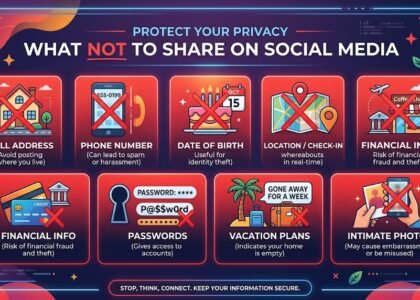
• Be Mindful of What You Share: Avoid posting sensitive personal information such as your home address, phone number, birthdate, travel plans, or details about your daily routine. This information can be used by criminals for physical crimes or social engineering.
• Location Services: Disable location services for social media apps or restrict their access to your location. Geotagged photos can reveal your whereabouts.
• Beware of Quizzes and Games: Many online quizzes and games ask for personal information (e.g., “What was your first pet’s name?”). These can be designed to harvest data that might be used for security questions or identity theft.
• Recognize and Report Scams: Be wary of fake profiles, unsolicited messages from strangers, and phishing attempts disguised as legitimate posts or direct messages. Report any suspicious activity to the platform.
• Limit Third-Party App Access: Review and revoke access for third-party applications that you no longer use or don’t trust. These apps often request extensive permissions to your data.
• Think Before You Click: Be cautious of links shared on social media, even by friends, as their accounts might have been compromised. Verify the legitimacy of links before clicking.
• Professional vs. Personal Profiles: Consider maintaining separate professional and personal profiles, especially on platforms like LinkedIn, to control the information you share with different audiences.
Protecting Against Account Takeovers
An account takeover occurs when an unauthorized individual gains access to your online account. This can happen through stolen credentials, phishing, malware, or brute-force attacks. The consequences can be severe, ranging from financial loss to reputational damage.
Steps to Prevent Account Takeovers:
• Implement All Above Practices: Strong passwords, MFA, and vigilance against phishing are your primary defenses.
• Monitor Account Activity: Pay attention to notifications from your email or social media providers about new logins, password changes, or suspicious activity.
• Use Password Managers: A password manager helps ensure you use unique, strong passwords for every account, reducing the risk of credential stuffing attacks (where attackers try stolen credentials from one site on other sites).
• Be Wary of Public Computers: Avoid logging into sensitive accounts on public computers or shared devices, as they may be compromised with keyloggers or other surveillance software.
By adopting a proactive and cautious approach to your email and social media usage, you can significantly enhance your digital security and protect your online identity from malicious actors. Remember, your online presence is a reflection of you, and it deserves to be protected with the utmost care.
Secure Online Transactions and Shopping
The Importance of Secure Online Shopping
Online shopping and banking provide convenience but also create opportunities for cybercriminals to steal financial information and commit fraud. Protecting online transactions is essential for safeguarding financial data and personal information.
The first step to secure online transactions is to ensure you are on a legitimate and secure website. Look for these key indicators:
• HTTPS (Hypertext Transfer Protocol Secure): Always check that the website address begins with https:// instead of http://. The ‘s’ stands for ‘secure’ and indicates that the communication between your browser and the website is encrypted, protecting your data from eavesdropping. Most browsers also display a padlock icon in the address bar for HTTPS sites.
• Padlock Icon: A padlock icon in the browser’s address bar signifies a secure connection. Clicking on it usually reveals details about the website’s security certificate, confirming its identity.
• Green Address Bar/Company Name: For highly secure sites, especially banking or financial institutions, some browsers may display a green address bar or the company’s name in green, indicating an Extended Validation (EV) SSL certificate. This provides a higher level of assurance about the website’s authenticity.
• Reputable Retailers: Stick to well-known and reputable online retailers. Be wary of unfamiliar websites offering deals that seem too good to be true, as they might be phishing sites or fronts for scams.
Payment Methods: Credit Cards, Digital Wallets, and Virtual Cards
Choosing the right payment method can add an extra layer of security to your online transactions.
• Credit Cards: Credit cards generally offer better fraud protection than debit cards. In case of unauthorized transactions, credit card companies often have policies that limit your liability, and they can help dispute fraudulent charges. Many offer zero-liability policies.
• Digital Wallets (e.g., PayPal, Apple Pay, Google Pay): Digital wallets add a layer of abstraction between your financial details and the merchant. When you use a digital wallet, your actual credit card number is often not shared with the merchant; instead, a unique, encrypted token is used. This reduces the risk of your card details being compromised if the merchant’s system is breached.
• Virtual Credit Cards: Some banks offer virtual credit card numbers that are temporary or single-use. These can be particularly useful for online purchases from less familiar websites, as they limit the exposure of your primary card number.
• Avoid Wire Transfers and Gift Cards: Never use wire transfers, gift cards, or cryptocurrency to pay for online purchases from unknown sellers or in response to unsolicited requests. These payment methods are often untraceable and are favored by scammers.
Protecting Your Financial Information
Beyond secure websites and payment methods, several practices can help safeguard your financial data.
• Strong, Unique Passwords and MFA for Banking/Shopping Accounts: Use robust, unique passwords and enable Multi-Factor Authentication (MFA) for all your online banking, credit card, and major shopping accounts. This is critical for preventing unauthorized access.
• Monitor Bank and Credit Card Statements: Regularly review your bank and credit card statements for any suspicious or unauthorized transactions. Report any discrepancies to your bank or card issuer immediately.
• Be Wary of Public Wi-Fi: Avoid conducting online banking or making purchases on unsecured public Wi-Fi networks. If you must, use a Virtual Private Network (VPN) to encrypt your connection (as discussed in Chapter 9).
• Keep Personal Information Private: Be cautious about the amount of personal information you share during online transactions. Legitimate businesses typically only require information necessary to complete the purchase and shipping.
• Secure Your Devices: Ensure your computer and mobile devices are protected with up-to-date antivirus software and firewalls. Keep your operating system and web browser updated to patch security vulnerabilities.
• Beware of Phishing and Smishing: Cybercriminals frequently use phishing emails and smishing texts to trick you into revealing banking credentials or credit card details. Always verify the sender and the legitimacy of any links before clicking.
• Use Dedicated Email for Shopping: Consider using a separate email address for online shopping and newsletters to minimize the exposure of your primary email to potential spam or phishing attempts.
Online Shopping Scams: What to Watch Out For
Beyond technical vulnerabilities, online shopping is also a fertile ground for various scams:
• Fake Websites: Scammers create websites that look identical to legitimate online stores, often with slightly altered URLs. These sites are designed to steal your payment information or sell counterfeit goods.
• Non-Delivery Scams: You pay for a product, but it is never delivered. The seller disappears after receiving payment.
• Counterfeit Goods: You receive a product, but it is a fake or of significantly lower quality than advertised.
• “Too Good to Be True” Deals: Be skeptical of incredibly low prices or exclusive offers from unknown sellers. If a deal seems too good to be true, it probably is.
• Subscription Traps: You sign up for a free trial, but it automatically converts to a paid subscription with hidden fees that are difficult to cancel.
By staying vigilant, understanding the security features of online platforms, and adopting secure payment practices, you can enjoy the convenience of online transactions while minimizing your exposure to fraud and cyber threats. Your financial security in the digital realm is largely in your hands.
The Necessity of Continuous Education
The cybersecurity landscape is dynamic. New threats emerge, existing threats evolve, and new technologies introduce new vulnerabilities. What was considered a best practice five years ago might be outdated or insufficient today. Therefore, continuous education is not just beneficial; it is essential for maintaining effective cybersecurity.
Why Continuous Education Matters:
• Evolving Threats: Cybercriminals are constantly innovating. Staying informed about the latest phishing techniques, malware strains, and social engineering tactics helps you recognize and avoid them.
• New Technologies: As you adopt new devices (IoT, smart home gadgets) or services (cloud platforms), understanding their specific security implications is crucial.
• Staying Ahead of the Curve: Education empowers you to anticipate potential risks rather than just reacting to them. It fosters a proactive security mindset.
• Empowerment: The more you know, the less susceptible you are to fear-mongering and manipulation. Knowledge builds confidence in your ability to navigate the digital world safely.
How to Stay Informed:
• Follow Reputable Cybersecurity News Sources: Subscribe to newsletters, blogs, or podcasts from trusted cybersecurity organizations, technology news sites, or government agencies (e.g., CISA, NIST, reputable tech journalists).
• Attend Webinars and Online Courses: Many organizations offer free or low-cost webinars and courses on cybersecurity awareness for individuals.
• Read Security Blogs and Articles: Dedicate time to reading articles that explain new threats and provide practical advice.
• Engage with Security Communities: Participate in online forums or communities where cybersecurity topics are discussed (with caution, as not all advice online is good advice).
• Review Software and Service Updates: Pay attention to the release notes for software updates, as they often highlight security improvements.
• Discuss with Peers: Share knowledge and experiences with friends, family, and colleagues. Collective awareness strengthens community defense.
Building a Security-Conscious Mindset
Ultimately, effective cybersecurity boils down to cultivating a security-conscious mindset. This means approaching every digital interaction with a healthy dose of skepticism and a critical eye. It’s about making security a habit, not an afterthought.
• Assume Compromise: While not paranoid, adopt a mindset that assumes your data or accounts could be targeted. This encourages vigilance.
• Question Everything: If something feels off – an email, a pop-up, a request – question its legitimacy. Verify before you trust.
• Be Proactive: Don’t wait for a breach to happen. Implement security measures before you need them.
• Learn from Mistakes: If you or someone you know falls victim to a scam or attack, analyze what happened and learn from it to prevent future occurrences.
By embracing digital hygiene and committing to continuous education, you transform from a passive user into an active participant in your own cybersecurity. This proactive approach is the most powerful tool you possess in the ongoing battle against cyber threats, ensuring your digital life remains safe, private, and productive.
You can find the first Part here, or see more Cybersecurity Articles here!
Basic Cyber Hygiene Best Practices By ENISA
Find more Cyber Security articles or contact us to learn how to better protect yourself, your business, and your digital environment from modern cyber threats.