Password Managers & Strong Passwords: The Foundation of Digital Security
Your password (and password manager) is the keys to your digital life. It protects your email, your banking, your social media, your work systems, your identity. Yet most people use passwords that are shockingly weak. “123456” and “password” top the list of most common passwords. People reuse the same password across dozens of services. They write passwords on sticky notes. They never change passwords after data breaches. These practices make credential theft trivially easy for attackers. One weak password compromises your entire digital life. This guide teaches you how to create strong passwords and manage them so you can actually remember them, or more accurately, so you don’t have to remember them at all.
Why Passwords Matter More Than Ever
Passwords are the foundation of digital security. Every other defense depends on your password being secret. If an attacker has your password, they have your account. Multi-factor authentication helps, but a strong password is the first line of defense. If your password is compromised, even MFA might not save you. If your email password is compromised, attackers can reset passwords on every service that uses your email for account recovery. Your password is the master key.
Yet password security has become increasingly difficult. Humans are terrible at creating and remembering strong passwords. We choose memorable words, birthdays, pet names—things that are easy for humans but easy for attackers to guess too. We reuse passwords across services to avoid forgetting them. We use weak passwords on services we think are unimportant. These practices are completely understandable. They’re also catastrophically insecure.
The statistics are bleak. Data breaches expose millions of passwords every year. Attackers maintain lists of compromised passwords and try them against other services. If you reuse passwords, one breach exposes your accounts everywhere. Password attacks cost organizations billions annually. Identity theft often starts with compromised passwords. The vast majority of cyberattacks that succeed begin with credential compromise.
But here’s the good news: strong passwords are actually easy to maintain if you use the right tools. Password managers solve the problem of password security. They generate strong passwords, remember them, and fill them in automatically. You only need to remember one strong master password. Everything else is protected.
Understanding Password Strength
Before discussing solutions, you need to understand what makes passwords strong. A strong password has three characteristics: length, complexity, and uniqueness.
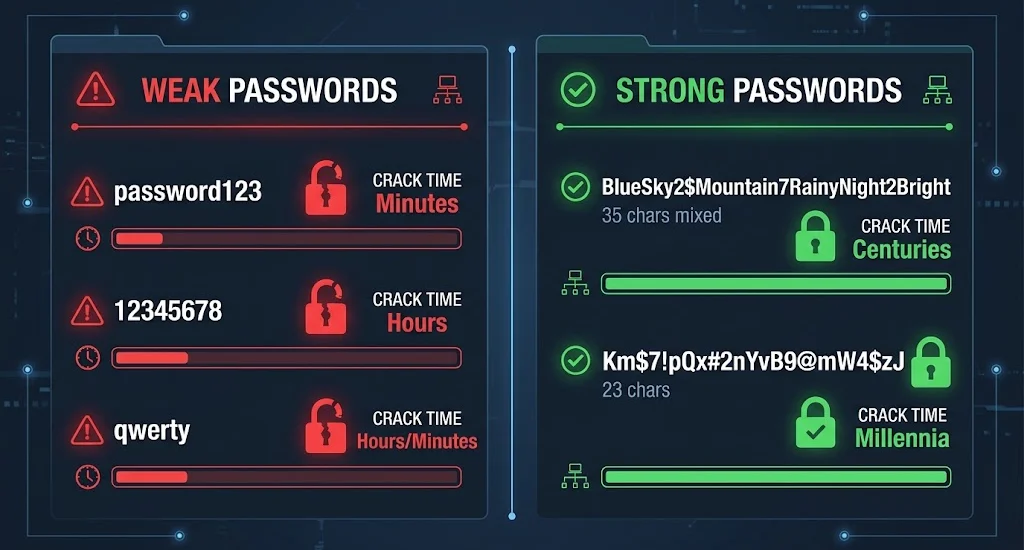
Length is the most important factor. A long password is exponentially harder to crack than a short one. An 8-character password can be brute-forced in hours. A 16-character password would take thousands of years with current technology. Password length matters far more than complexity. A 20-character password of only lowercase letters is stronger than an 8-character password of mixed case, numbers, and symbols.
Complexity means using different character types: uppercase letters, lowercase letters, numbers, and symbols. A password using all four types is harder to crack than one using only lowercase letters. But complexity alone isn’t enough. A complex but short password (like “Abc#123”) is still weak.
Uniqueness means using different passwords for different services. If you use the same password everywhere and one service is breached, all your accounts are compromised. Every service should have a unique password. This seems impossible to manage—and it is, without a password manager.
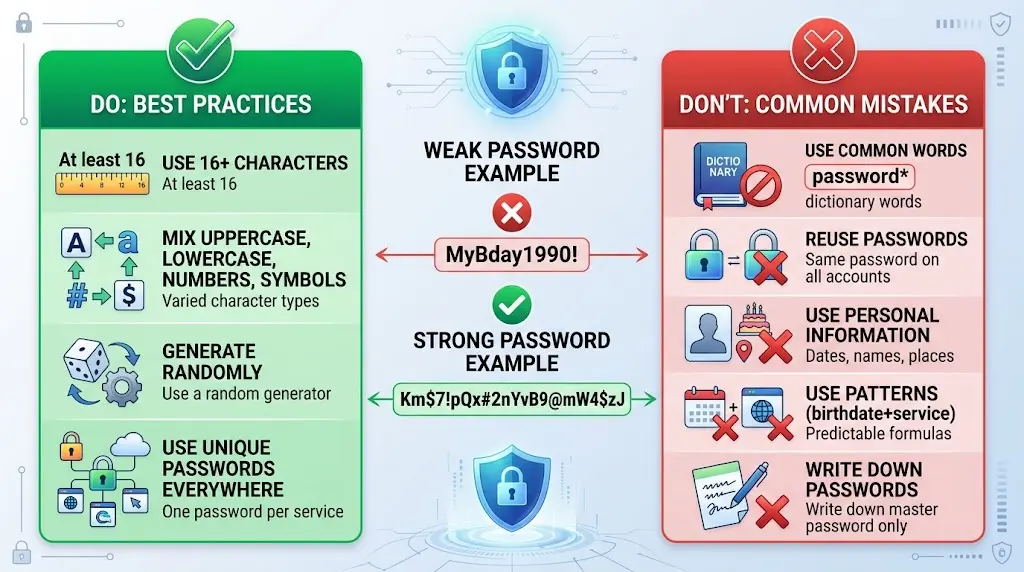
The ideal password is long, complex, and unique. For example: “Km$7!pQx#2nYvB9@mW4$zJ” is a 23-character password using uppercase, lowercase, numbers, and symbols. It’s strong. But memorizing 50 different passwords like this is impossible for humans. This is where password managers solve the problem.
The Problem With Traditional Password Management
People have tried various approaches to manage passwords. Some write passwords in a notebook. This protects against forgetting passwords but creates physical security risk. The notebook is vulnerable to theft. Anyone with access to the notebook has access to all passwords. If the notebook is lost or stolen, all accounts are compromised. Writing passwords down is a practice security professionals universally recommend against—yet it’s understandable because the alternative (memorizing dozens of complex passwords) is impossible.
Some use the browser’s built-in password manager. Chrome, Firefox, and Safari all offer to save passwords. This is better than writing them down. But browser password managers have limitations. They only work when using that browser. If you switch computers, the passwords don’t follow. They don’t generate new passwords—they only save passwords you create. They don’t help you create strong passwords. They work, but barely.
Some use the same weak password everywhere. This is appealing because only one password needs to be remembered. But it’s catastrophically insecure. When one service is breached—and services are breached constantly—attackers have your password everywhere. They log into your email, banking, social media, everything. One breach exposes everything.
Some use password patterns. “For Gmail I use Gm@il2024, for Facebook I use Fb@cebook2024…” This seems clever until you realize attackers use pattern-matching algorithms. Once they crack two passwords, they can predict the third. Pattern-based passwords create false confidence while being nearly as weak as reused passwords.
None of these approaches are adequate. You need a solution that:
– Generates truly random, strong passwords
– Remembers all passwords for you
– Works across all devices and browsers
– Is secure even if devices are compromised
– Lets you access passwords when you need them
This is what password managers do.
How Password Managers Work
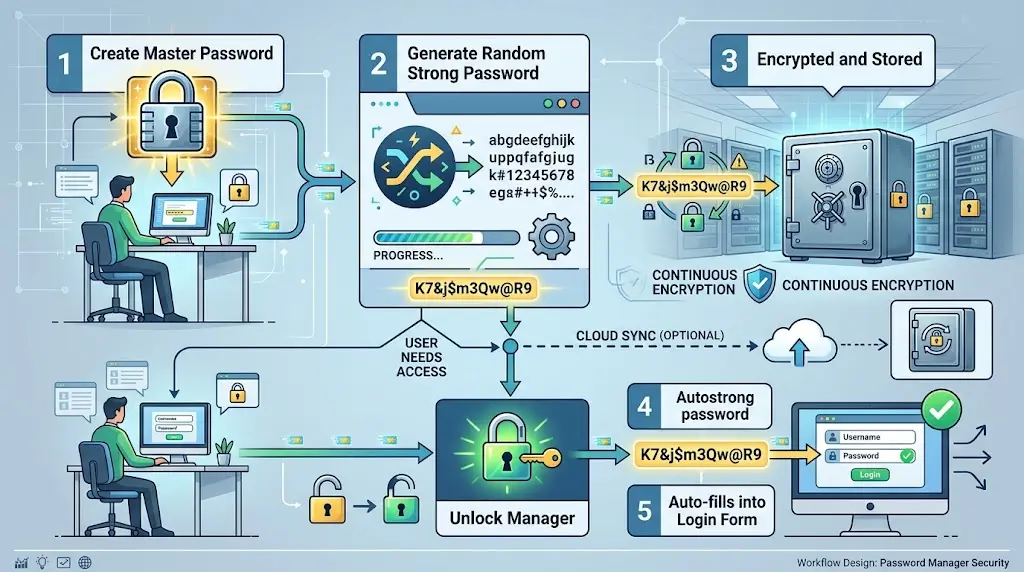
Password managers are applications designed specifically to generate, store, and manage passwords securely. They work through encryption and a master password.
When you create a password manager account, you choose one master password. This is the only password you need to remember. Make it strong, at least 16 characters with mixed case, numbers, and symbols. Write it down somewhere secure if necessary. This is the only password worth writing down.
The password manager uses your master password to encrypt your password vault. All your stored passwords are encrypted with your master password. Even if a hacker breaches the password manager company’s servers, they can’t decrypt your passwords without your master password. The encryption is so strong that even with massive computational resources, breaking it would take longer than civilization has existed.
When you need a password, you unlock the password manager with your master password. The passwords are decrypted. You can view them, copy them, or have the password manager fill them into login forms automatically. When you close the password manager, the passwords are encrypted again.
When you need a new password, the password manager generates one. It creates a random string of the specified length using uppercase, lowercase, numbers, and symbols. The password is cryptographically random—not pseudo-random or pattern-based. It’s as random as possible. It saves the password in your encrypted vault and fills it into the registration form. This process repeats for every service. After months of using a password manager, you have hundreds of unique, strong passwords. You remember only the master password. Your digital security is dramatically improved.
Choosing a Password Manager
Several excellent password managers exist. The choice depends on your needs and preferences.
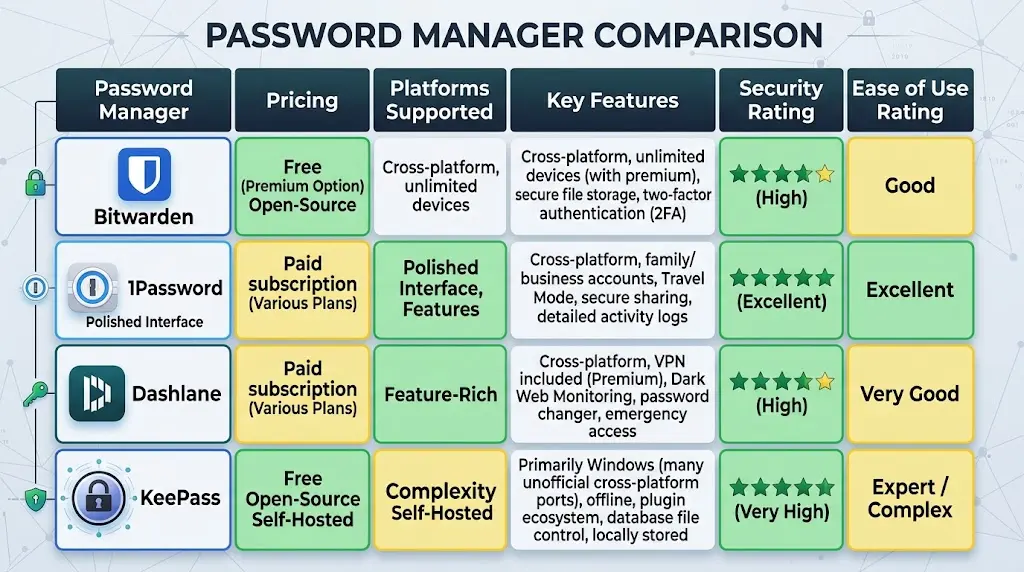
Bitwarden is open-source and free. Open-source means the code is publicly available for security researchers to audit. Free means there’s no subscription cost. Bitwarden stores passwords in encrypted form on their servers or your own servers. It syncs across devices. It works on all major platforms. For individuals wanting a free, transparent solution, Bitwarden is excellent.
1Password is commercial and subscription-based ($3-5/month). It offers a polished user interface and excellent customer support. It provides family plans covering multiple users. It integrates deeply with Apple devices if you use Apple products. For people willing to pay for convenience, 1Password is popular.
Dashlane is commercial ($5-10/month) and emphasizes ease of use. It includes identity protection features beyond passwords. It offers dark web monitoring to detect if your information appears in breaches. For people wanting comprehensive protection beyond just passwords, Dashlane is good.
LastPass was popular until security issues damaged its reputation. Multiple breaches and data exposure incidents created trust concerns. While they claim to have improved security, other options are safer choices now.
KeePass is open-source and free but requires manual setup. You create a password database and sync it across devices yourself. It’s maximally secure but requires technical knowledge. For security-focused individuals comfortable with technical setup, KeePass works.
For most people, Bitwarden (free) or 1Password (paid) are the best choices. Both are secure, user-friendly, and widely trusted.
Creating Strong Passwords When You Must Manually Create Them
While password managers should generate most passwords, some services don’t accept generated passwords (unusual symbols requirements) or situations require manually creating passwords. Here’s how.
Use at least 16 characters. Length is your primary defense. Something like “BlueSky$Mountain7RainyNight2Bright” (35 characters, mixed case and numbers) is extremely strong.
Include uppercase letters, lowercase letters, numbers, and symbols. Don’t just add one of each—spread them throughout. “BlueSky2$Mountain” is stronger than “Blueskyandmountain2$” because complexity is distributed.
Avoid common words, birthdays, pet names, or personal information. Attackers know these patterns. They use dictionaries of common words. They try dates and personal information. Avoid predictable patterns.
Use passphrases instead of single words. A passphrase combines multiple words into a sentence-like structure. “BlueSky2$Mountain7RainyNight2Bright” is a passphrase, it’s not a word but rather a combination of words with numbers and symbols mixed in. Passphrases are often stronger than complex single words because they’re longer and more random.
Never use the same password twice. Each service should have a unique password. This is why password managers are essential, memorizing unique passwords for 50 services is impossible.
Use a password generator if you’re not using a password manager. Sites like random.org generate random strings you can customize for length and character types.
Managing Passwords Securely
Using a password manager is just the first step. You must also manage your master password and backup access.
Your master password should be strong and unique. It’s the only password worth memorizing. Don’t write it anywhere except perhaps a physical location—a safe, a safe deposit box, where only you have access. Don’t store it digitally except in the password manager itself (some allow storing a hint).
Enable multi-factor authentication on your password manager account. If someone compromises your master password, MFA provides additional protection. They can’t log into your password manager without the MFA code.
Back up your password manager. If you use a cloud-based service, they handle backup. If you use a self-hosted solution like KeePass, you must back up your password database. Store the backup in a different location. Encrypt the backup. If your primary device dies, you can recover your passwords from the backup.
Review your stored passwords occasionally. Mark old accounts for deletion when you no longer use them. Update passwords on critical accounts (email, banking) every few months. Update passwords immediately if the service is breached.
Use your password manager’s security audit features. Most password managers can identify weak passwords you may have manually created before adopting a password manager. They’ll highlight reused passwords. They’ll check if your passwords appear in known breaches. Review these reports and fix identified issues.
Common Concerns About Password Managers
People often worry about password managers. “If the password manager is compromised, all my passwords are lost.” Actually, no. If a password manager company is breached, attackers get encrypted password vaults. Without your master password, the vaults are useless. Modern encryption means decryption without the master password is impossible even for sophisticated attackers. Your passwords remain secure.
“What if I forget my master password?” Password managers typically allow account recovery using email verification or recovery codes. When you create a password manager account, you receive recovery codes. Store these safely. If you forget your master password, recovery codes let you reset it. They’re essential for recovery.
“Aren’t password managers a single point of failure?” Yes, but a single point of failure where you have complete control is far better than dozens of weak passwords or passwords written down. Password managers are specifically designed to be secure. Security researchers audit them. Vulnerabilities are typically fixed quickly. The security of a password manager is far higher than your ability to manually create and remember strong unique passwords.
“What if the password manager company shuts down?” Most password managers allow exporting your passwords. You can export them and import them into a different password manager. Cloud-based password managers are large companies unlikely to shut down. For smaller services, check their shutdown policy and export options before committing.
The Connection to Other Security Measures
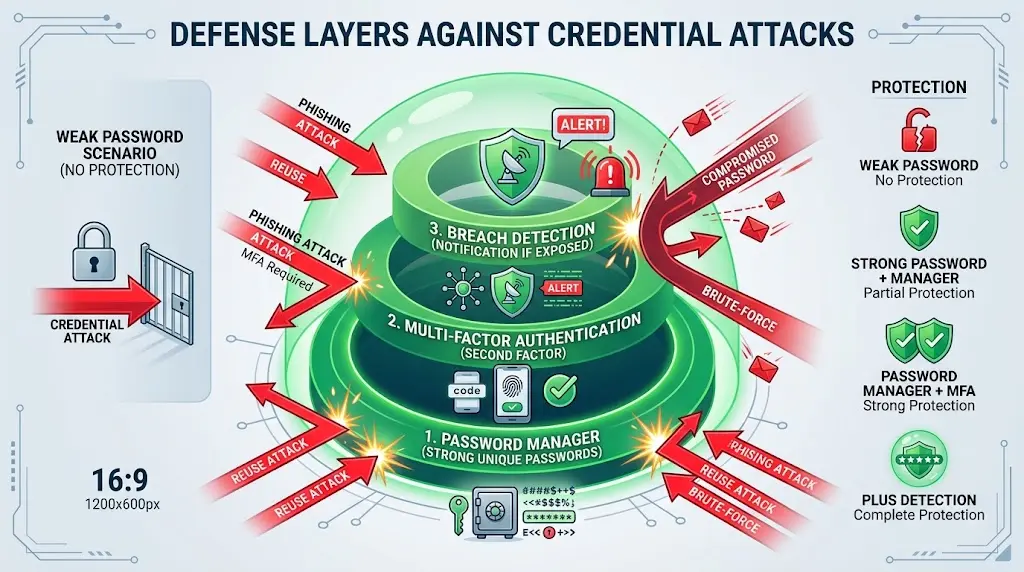
Strong passwords protected by password managers form the foundation of security. They prevent credential-based attacks. They protect against phishing attacks that steal passwords. They protect against data breaches that expose passwords. Without strong password management, everything else—MFA, network segmentation, monitoring, is built on a weak foundation.
MFA protects against compromised passwords. Even if attackers have your password, MFA prevents access without the second factor. Together, strong passwords and MFA create powerful protection. Password managers make strong, unique passwords practical. Multi-factor authentication makes compromised passwords less harmful.
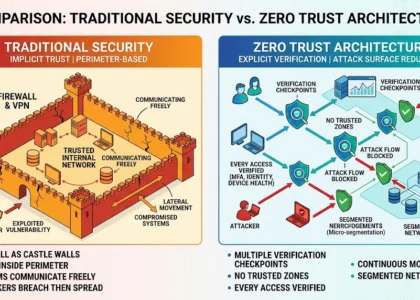
Zero Trust architecture assumes passwords might be compromised. It implements additional verification beyond just passwords. Continuous authentication watches for unusual behavior. Device health checks ensure devices aren’t compromised. Access controls limit what passwords grant access to. Strong passwords are the foundation, but Zero Trust provides the additional layers.
All the attacks discussed in previous articles, phishing, ransomware, identity theft, start with compromised credentials. Strong password management prevents the initial compromise. Combined with other defenses, it provides comprehensive protection.
FAQ: Password Manager Questions
Q: Should I use my browser’s password manager or a dedicated application?
A: Dedicated applications are more secure and feature-rich. Browser password managers work but lack features like password generation and cross-device syncing. Use a dedicated password manager and disable your browser’s password manager to avoid confusion.
Q: Is it safe to use the same master password across multiple services?
A: No. Use your password manager’s master password only for the password manager. Use different passwords for email, banking, and other critical services. The password manager generates and manages these—you just need one strong master password for the password manager itself.
Q: How often should I change my passwords?
A: Regularly but not obsessively. Change passwords every 3-6 months for critical accounts. Change passwords immediately if a service is breached. Modern recommendations suggest length and complexity matter more than frequent changes. A strong password kept for a year is better than a weak password changed monthly.
Q: What if a service requires a password I can’t change?
A: Some old systems have unusual password requirements. Create the strongest password the system allows. Make it as long as possible. Add as much complexity as the system permits. It’s not ideal, but it’s better than a weak password.
Q: Can I share passwords with family members using a password manager?
A: Yes. Most password managers have sharing features. You can share specific passwords with family members. Shared passwords appear in their vault. If you change the password, their copy updates. This is useful for shared accounts like family email or streaming services.
Q: Is cloud-based or self-hosted password storage better?
A: Cloud-based (like Bitwarden, 1Password) is more convenient. You access passwords from any device. Self-hosted (like KeePass) is more control—you own the server. For most people, cloud-based with a strong master password is sufficient. For security-conscious individuals, self-hosted is an option.
Conclusion: Passwords Are Your Responsibility
Passwords are the foundation of your digital security. You can’t outsource password management to someone else. You control your passwords. If you use weak passwords or reuse them, your security is weak. If you use strong, unique passwords, your security is strong.
Password managers make strong password management practical. They eliminate the burden of memorizing dozens of complex passwords. They generate truly random, strong passwords. They sync across devices. They’re transparent about security. They’re affordable or free.
The only work you need to do is choose a password manager, create a strong master password, and commit to using it for all accounts. This single change improves your security more than almost any other step you can take. Combined with multi-factor authentication and the other defenses discussed in previous articles, strong password management creates comprehensive protection against credential-based attacks.
Don’t use weak passwords. Don’t reuse passwords. Don’t write passwords down. Use a password manager. This simple practice protects your digital life more effectively than expensive software or complicated procedures. Start today. Your future self will thank you when your accounts remain secure while others suffer breaches.
This article is published exclusively for informational and educational purposes. Its goal is to enhance cybersecurity awareness, inform users, and help prevent modern digital threats.The information presented is not intended for malicious use or to promote illegal activities.
Find more Cyber Security articles or contact us to learn how to better protect yourself, your business, and your digital environment from modern cyber threats. Also, explore How attackers bypass MFA to commit CEO fraud.