How to Detect Cyber Attacks: 7 Warning Signs You’re Compromised
Most people don’t realize they’ve been hacked until significant damage has already occurred. A criminal might steal your data weeks before you notice. Ransomware could be spreading through your network right now while you think everything is fine. The difference between a manageable cyber incident and a catastrophic one often comes down to detection speed. This guide teaches you seven warning signs that reveal you’re under attack, right now, when you can still do something about it.
Why Early Detection Matters
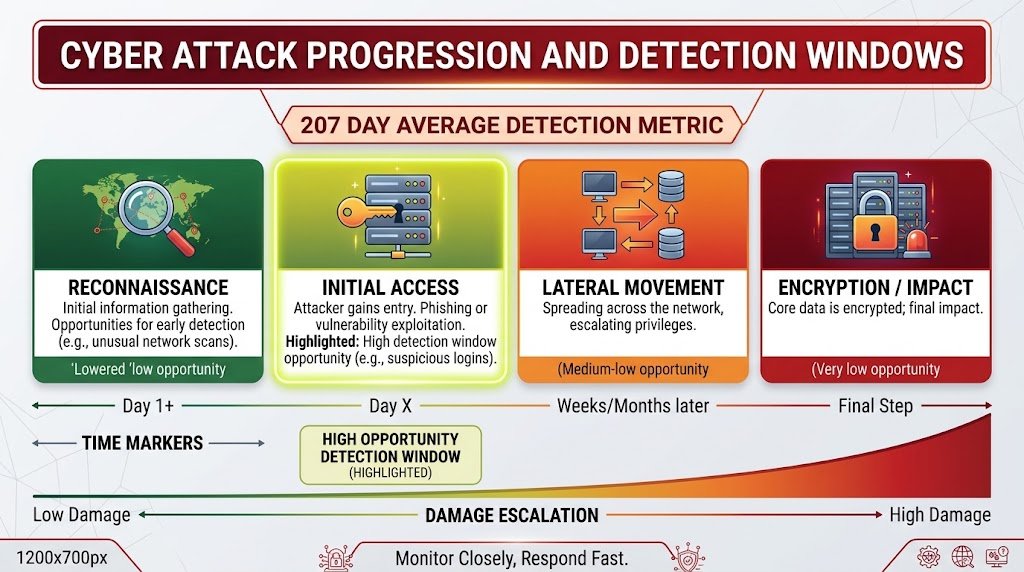
Cyber attacks don’t announce themselves. Attackers work quietly, methodically, trying to remain undetected for as long as possible. The longer they stay hidden, the more damage they can cause. Data theft happens in silence. Ransomware spreads while you sleep. Malware establishes persistence before you notice anything is wrong.
But here’s the critical insight: attackers leave traces. Even sophisticated attacks create observable patterns. Unusual logins appear in account logs. Files appear in unexpected locations. Network traffic changes. Your accounts behave differently. These signs exist, but only if you know what to look for.
The statistics are sobering. The average time to detect a data breach is 207 days. For ransomware attacks, every day the attacker remains undetected means they’ve had time to steal more data, escalate their access, and prepare encryption. Organizations that detect attacks in the first 24 hours face dramatically less damage than those who discover attacks weeks or months later.
Early detection transforms the entire response. If you catch an attack in its early stages, you might isolate a single compromised account before an attacker reaches critical systems. If you wait, an attacker might have already stolen all your data and encrypted your backup systems. The seven warning signs in this guide are your opportunity to detect attacks early and minimize damage.
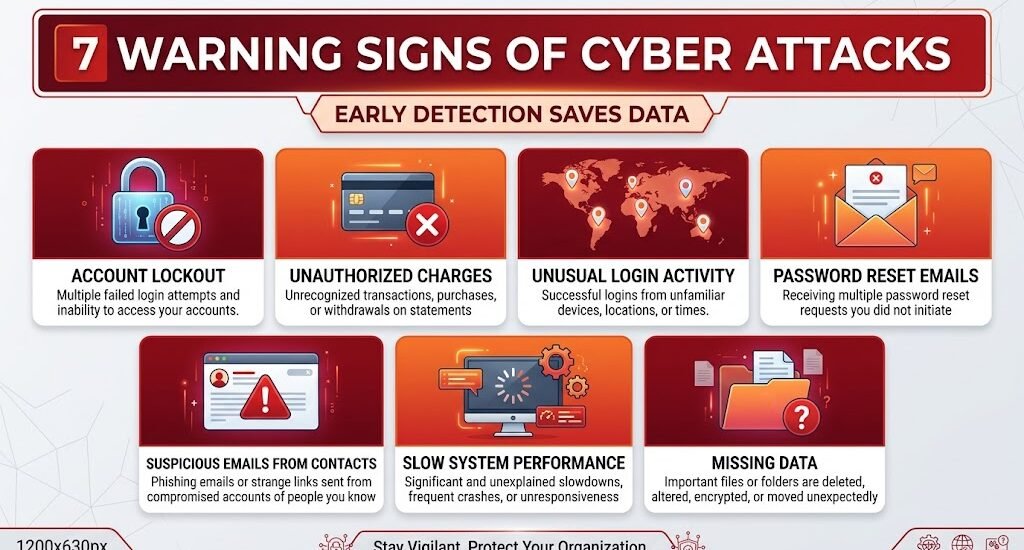
Warning Sign #1: Unexpected Account Lockouts or Access Denied
You try to log into your email, bank account, or work system, and suddenly you’re locked out. The password you’ve used for months no longer works. When you request a password reset, you get a message that the email address on file is different from what you remember, or you receive reset emails you never requested.
This warning sign indicates an attacker has already gained access to your account and is trying to lock you out. They’ve changed the password and possibly the recovery email address. They’re trying to cut off your access so you can’t undo their changes. If your account is valuable—email, banking, social media, work systems—attackers want to maintain control and prevent you from discovering the breach.
The severity depends on which account is compromised. If it’s your email account, it’s extremely serious. Email is the master key to other accounts. An attacker controlling your email can reset passwords on banking, social media, shopping sites, and work systems. If you lose access to your email, you’ve potentially lost access to everything that uses that email for account recovery. If it’s a banking account, immediate action is critical. If it’s social media, the damage is different but potentially significant if your account is used to impersonate you.
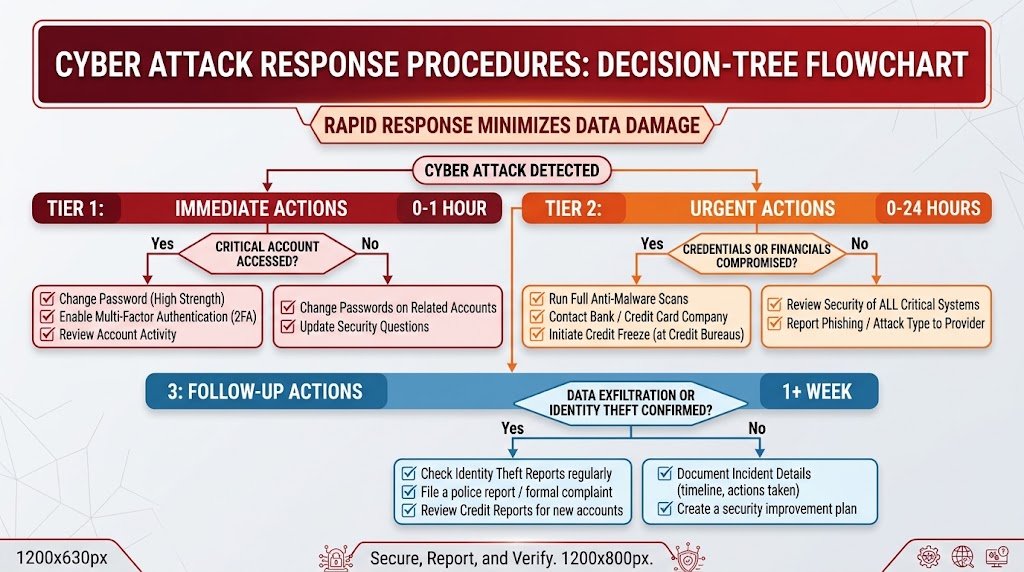
The immediate response is critical. Use an alternative email address or recovery method to regain access. Change your password to something completely new. Enable multi-factor authentication if you can access the account. Review recent login activity to see where unauthorized access occurred. Check connected accounts and services that rely on this account for authentication. If you cannot regain access, contact the service provider’s support team immediately and verify their identity before providing personal information.
Warning Sign #2: Unauthorized Charges, Transfers, or Account Activity
You review your bank statement or credit card bill and notice charges you definitely did not make. Maybe it’s a small amount, maybe it’s significant. You see transfers to accounts you don’t recognize. Your online shopping account shows orders you never placed. Money is leaving your account without your authorization.
This indicates attackers have compromised your financial credentials or payment methods. They’ve gained access to your banking password, stolen your credit card number, or compromised your payment system account. They’re testing whether they can spend money before conducting larger theft. Some attackers start with small charges to see if you notice. If you don’t react, they proceed to larger theft. Others conduct large transfers immediately.
The financial impact is serious, but there’s also an identity component. If someone is accessing your bank account, they’re seeing your account numbers, transaction history, and connected financial information. They might be using this data for identity theft or selling it to other criminals. The credit damage can last years even after you resolve the immediate theft.
Your response must be swift. Contact your bank or credit card company immediately using the phone number on the back of your card or from their official website—not from any email or notification. Report unauthorized charges and request them to be reversed. Ask the financial institution to freeze your account and issue a new card. Request a fraud report. Request a credit freeze with the three major credit bureaus. Review your credit reports for fraudulent accounts opened in your name. Set up account alerts for any future unauthorized activity.
Warning Sign #3: Unusual Login Activity from Unfamiliar Locations
You access your account’s login history and see entries from places you’ve never been. Locations show countries you’ve never visited. Times show logins while you were sleeping or at work at a different location. Login devices are unfamiliar—iPhones you don’t own, Chrome browsers you don’t use, IP addresses that don’t match your normal usage.
This indicates an attacker has obtained your account credentials and is accessing your account. They might be using a password leaked in a data breach, a password they guessed, or a password they phished from you. They’re exploring your account, seeing what data is there, and determining what value it has. They might be stealing information, setting up forwarding rules for emails, or planting backdoors for future access.
Many services now provide login activity information. Gmail shows recent device activity. Facebook displays login history by location. Banking apps show login attempts. AWS and other cloud services provide detailed activity logs. These features exist specifically so you can detect unauthorized access. Most people never check them.
The response depends on whether you still have account access. If you can access your account, change your password immediately to something completely new and unrelated to passwords you’ve used before. Enable multi-factor authentication if available. Check account settings for suspicious activity: forwarding rules, connected apps with access, recovery email addresses, phone numbers associated with the account. Remove any unrecognized devices or apps. If you cannot access your account, follow the unauthorized access recovery process through the service provider. If the compromised account is your email, the risk is extremely high. Treat it as a critical emergency.
Warning Sign #4: Emails About Password Resets You Didn’t Request
Your email suddenly fills with messages from services you use: password reset confirmations, verification codes, device login alerts, two-factor authentication requests. You didn’t request any of these. You didn’t try to log in to these services. Yet somehow, attackers are trying to access your accounts.
This warning sign indicates attackers have obtained your email address and are attempting to breach your other accounts using it for password recovery. They might have your email address from a data breach, purchased it from criminals, or gathered it from OSINT research. They’re systematically trying to reset passwords on every service that uses your email. They’re trying to log in to see which services you use. They’re checking whether your accounts are protected by multi-factor authentication.
This is particularly dangerous because attackers are revealing their presence by generating these notifications. They’re willing to alert you because they’re trying multiple services and hope you miss the notifications. If you notice this attack pattern, it means your email address is actively under attack right now.
The response is defensive but urgent. Do not click password reset links in these emails unless you actually initiated them. Instead, go directly to each service’s website and check for unauthorized access. Change your password on any accounts you’re concerned about. Most importantly, enable multi-factor authentication on every account that offers it. Multi-factor authentication makes these reset attempts fail because attackers can’t verify the reset code. If the attacker doesn’t have your phone or authentication app, they can’t complete the account recovery.
Warning Sign #5: Unexpected Emails from People You Know
You receive an email from a friend, colleague, or family member asking for money, containing suspicious links, or asking you to confirm personal information. The writing might seem slightly off, the urgency might feel artificial, but it appears to come from someone you trust. You later discover the person never sent it. Their email account has been compromised.
This indicates that your contact’s account has been hacked and is being used to send phishing emails or malware to everyone in their contact list. The attacker is weaponizing your contact’s trust. You’re more likely to click a link from someone you know than from a stranger. You’re more likely to help someone you know who says they’re in trouble. The attacker is exploiting that relationship.
But there’s another implication: if your contact’s email was compromised, there’s a reasonable chance yours could be too. You likely have similar security practices. You might have reused passwords. You might be vulnerable to the same phishing campaigns. Attackers that successfully compromised your contact might have obtained your email address from their contact list.
The immediate response is to alert your contact that their account has been compromised. Tell them not to click links in emails they don’t remember sending. Suggest they change their password and enable multi-factor authentication. For yourself, review your own account security. Check your email settings for forwarding rules or app access that might indicate compromise. Review your sent folder for emails you don’t remember sending. If you’re concerned, change your password.
Warning Sign #6: Slow Performance, Strange Processes, or System Crashes
Your computer suddenly runs slowly even though you’re not using resource-intensive applications. Your laptop fan runs constantly. Your phone’s battery drains faster than normal. You see unfamiliar applications or processes running in your task manager. Your system crashes unexpectedly or freezes frequently. Your internet connection seems slower than usual.
These signs suggest malware infection. Malware often consumes system resources—your CPU, memory, network bandwidth—for its own purposes. It might be mining cryptocurrency, sending spam emails, performing DDoS attacks, or exfiltrating data. The side effect is degraded system performance. Your computer is being used for criminal purposes, which consumes resources and makes your system unstable.
Performance issues have many causes—malware is just one. Your hard drive might be failing. Your system might need more RAM. Legitimate applications might be consuming resources. But malware is common enough and serious enough that unexplained performance degradation warrants investigation.
The response involves checking what’s actually running on your system. Open Task Manager (Windows) or Activity Monitor (Mac) and look at running processes. Search for any unfamiliar process names online to see if they’re legitimate or malware. Update your antivirus and anti-malware software and run a complete system scan. The scan should identify and remove any malware. If problems persist after malware removal, there might be legitimate technical issues. If problems stop after malware removal, you’ve successfully detected and eliminated an active infection.
Warning Sign #7: Missing Data, Unusual Files, or Changed Settings
You open a folder and some files are missing. Files you created months ago are suddenly gone. You navigate to a location and find strange files with random names. Your desktop background changed. Your browser homepage changed. Your default search engine is different. System settings have been modified. You see file extensions you don’t recognize.
These signs indicate an attacker has file-level access to your system. They might have deleted files to destroy evidence of their presence. They might have encrypted files for ransomware attacks. They might have installed software that changes system settings. They might have created backup files for their own purposes. Any modification to your filesystem without your knowledge indicates compromise.
The severity depends on what’s missing or changed. Missing important files indicate potential data theft or ransomware. Changed system settings might indicate malware has established persistence. Unfamiliar files might be attacker tools, stolen data, or malware payloads. In all cases, the implication is that someone else has control of your system.
The response depends on the extent of the compromise. If a few system settings changed, it might be reversible. Change them back, update your antivirus, run a full system scan. If important files are missing or encrypted, you might be experiencing ransomware. In that case, the response is different: isolate your system from the network, preserve evidence for recovery purposes, and contact professional recovery services if needed. If you have backups, recovery from backups might be possible. If not, you have limited options and might need to involve law enforcement.
What These Signs Have in Common
Each warning sign represents a different aspect of compromise, but they share a common thread: they’re all observable. Attackers want to stay hidden, but they can’t perform their attacks silently. They need to access your accounts. They need to move data. They need to install software or steal credentials. These actions create evidence.
The key insight is that you have a window of opportunity. Between the moment an attack begins and the moment you notice it might be days, weeks, or months. That window is your chance to interrupt the attack, regain control, limit damage, and recover. Most people don’t look for warning signs and don’t notice until damage is catastrophic. By knowing what to look for, you’re dramatically more likely to catch attacks early.
Understanding these warning signs isn’t about becoming paranoid or obsessing over every notification. It’s about developing basic awareness. Check your account activity occasionally. Review login histories. Notice unusual charges or emails. Pay attention to system performance. If something seems wrong, it probably is. Trust your instincts and investigate.
Connected Attack Types Explained
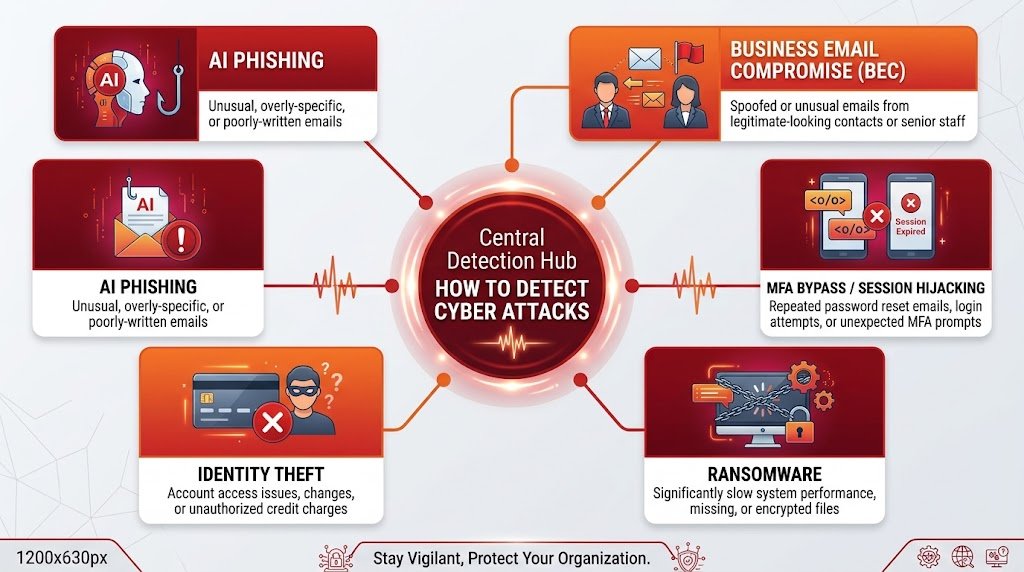
Each of the warning signs you might experience relates to specific attacks covered in detail in other guides. Unauthorized charges might indicate AI phishing led to credential theft. Unexpected password reset emails might mean you’re experiencing Business Email Compromise reconnaissance. Malware and performance issues might indicate the early stages of ransomware deployment. Account lockouts might mean attackers are bypassing your multi-factor authentication. Missing files might indicate identity theft data theft. Understanding which attack types produce which warning signs helps you respond appropriately.
What to Do If You Notice Warning Signs
Don’t panic. Panic leads to hasty decisions. The fact that you noticed an attack is already a major advantage. Most victims never notice. You have a chance to respond. Start by changing your passwords—all of them, on new devices if possible. Enable multi-factor authentication on every account that supports it. Check your connected devices and remove anything unrecognized. Review account settings and remove suspicious app permissions. Run antivirus and anti-malware scans. Check your credit reports for fraudulent accounts. Contact your bank or service providers if financial accounts are involved. Document everything you notice for reference later.
If you’re overwhelmed or unsure, getting professional help is okay. Cybersecurity professionals can investigate thoroughly, remove malware completely, and advise on recovery. For individuals, the cost might seem high, but it’s often less than the damage from unaddressed compromises. For organizations, professional incident response is almost always worth the investment.
FAQ: Detection Questions
Q: How often should I check my account activity?
A: Checking every month is reasonable for most people. Monthly checks let you notice compromises quickly enough to respond. If you have financial accounts, checking every two weeks is safer. If you’ve recently been compromised, checking weekly makes sense until you’re confident the issue is resolved.
Q: Can warning signs appear in false alarms?
A: Absolutely. Not every unusual charge is fraud. Not every strange login is an attacker. Sometimes legitimate services send unexpected emails. Sometimes your system slows down for innocent reasons. But when warning signs appear, investigating is always warranted. False alarms are preferable to ignoring real attacks.
Q: Should I change my passwords if I haven’t noticed attacks?
A: Yes. Change passwords regularly even if you haven’t detected compromise. Change passwords more frequently for important accounts like email and banking. Use completely new passwords, not variations of old ones.
Q: What if I notice signs but I’m not sure what they mean?
A: When in doubt, treat it as a potential compromise and respond defensively. Change your passwords, enable multi-factor authentication, run antivirus scans. If it turns out to be a false alarm, no harm done. If it’s a real attack, you’ve responded appropriately.
Conclusion: Awareness is Your First Defense
Cyber attacks are inevitable in a connected world. But catastrophic damage is not inevitable. The difference often comes down to early detection. By knowing these seven warning signs and checking for them occasionally, you give yourself a fighting chance. You’re not trying to become a security expert. You’re just staying alert to obvious signs that something is wrong.
Your accounts, your data, and your identity are targets. You’ll never prevent all attack attempts. But you can detect attacks early. You can interrupt attackers before they cause major damage. You can recover from compromise if you notice it quickly. Early detection, combined with the defensive practices covered in other guides—strong passwords, multi-factor authentication, software updates, offline backups—creates a security posture that stops most attacks and limits damage from those that succeed.
Stay vigilant. Trust your instincts. When something seems wrong, investigate. Early detection is your superpower against cyber criminals.
External links for more information:
NIST – AI Security & Risk Management
CISA – Phishing & Deepfake Defense
FBI IC3 – Phishing & Deepfakes
Find more Cyber Security articles or contact us to learn how to better protect yourself, your business, and your digital environment from modern cyber threats. Also, explore How attackers bypass MFA to commit CEO fraud